> ## Documentation Index
> Fetch the complete documentation index at: https://docs.roxom.com/llms.txt
> Use this file to discover all available pages before exploring further.
# How to deposit crypto into your Roxom account
> Step-by-step guide to deposit BTC, USDC, or USDT into your Roxom Funding Account.
Depositing crypto into Roxom is fast and secure. You can fund your account with **BTC**, **USDC**, or **USDT**. This guide walks you through the steps, requirements, and important details for each currency.
## Before you begin
Your account must be **verified** to access deposit addresses. If your **Account Verification (KYC)** is still pending, you won't be able to make deposits yet.
## Supported currencies and networks
| Detail | Value |
| :------------------------- | :-------------- |
| **Network** | Bitcoin (BTC) |
| **Minimum deposit** | 0.000006 BTC |
| **Confirmations required** | 3 |
| **Estimated time** | 30-60 minutes |
| **Funds credited to** | Funding Account |
| Detail | Value |
| :--------------------------- | :---------------------- |
| **Networks** | Polygon, Base, Ethereum |
| **Minimum deposit** | 1 USDC |
| **Confirmations (Polygon)** | 120 |
| **Confirmations (Base)** | 30 |
| **Confirmations (Ethereum)** | 32 |
| **Funds credited to** | Funding Account |
| Detail | Value |
| :--------------------------- | :---------------------- |
| **Networks** | Polygon, Base, Ethereum |
| **Minimum deposit** | 1 USDT |
| **Confirmations (Polygon)** | 120 |
| **Confirmations (Base)** | 30 |
| **Confirmations (Ethereum)** | 32 |
| **Funds credited to** | Funding Account |
**Polygon**, **Base**, and **Ethereum** are all EVM-compatible networks. Your deposit address is the same across all three networks and for both USDC and USDT, you only need one address for all EVM deposits.
## How to start a deposit
From the main navigation, click the [**Deposit**](https://roxom.com/exchange/account/deposit) button (top-right) to open the **Deposit Crypto** screen.
## Deposit flow
Choose the currency you want to deposit: **BTC**, **USDC**, or **USDT**.
* For **BTC**: the network is fixed to **Bitcoin (BTC)**.
* For **USDC** or **USDT**: choose between **Polygon**, **Base**, and **Ethereum**.
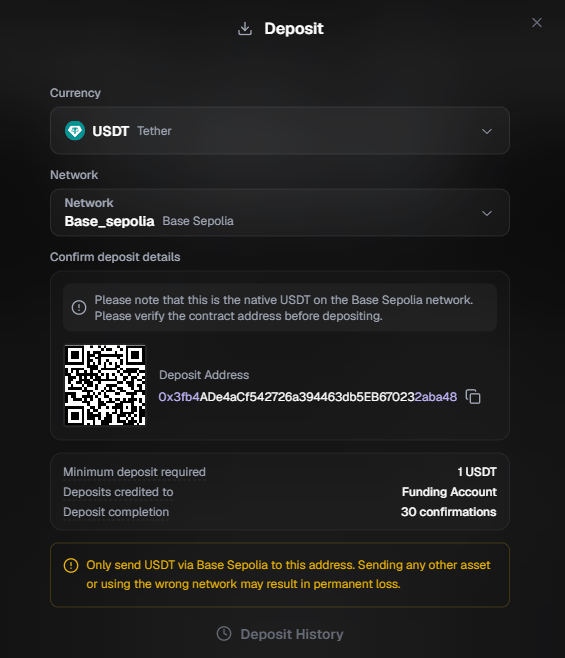
You'll see your personal deposit address and a QR code. Copy the address or scan the QR code from your sending wallet.
* **BTC addresses** start with: `1`, `3`, `bc1q`, or `bc1p`
* **USDC/USDT addresses** are EVM addresses starting with `0x`
Below the address, you'll find key details:
* **Minimum deposit required** (e.g., 1 USDT)
* **Deposits credited to**: Funding Account
* **Deposit completion**: number of confirmations needed
For **USDC/USDT deposits**, the platform will display a reminder to verify you are sending the **native token on the selected network**. Always confirm the contract address before depositing.
Initiate the transfer from your external wallet or exchange using the copied address. Double-check the address and selected network before confirming.
Here's an example of the deposit screen when depositing **USDT on Polygon**:
**Send only the correct asset on the correct network.**
* **BTC** must be sent over the **native Bitcoin network** only.
* **USDC/USDT** must be sent over **Polygon**, **Base**, or **Ethereum** only.
Do **not** send BTC via BEP-20, ERC-20, Lightning, or any other network. Do **not** send USDC/USDT on unsupported networks (e.g., Arbitrum, Optimism, BNB Chain).
Deposits made through an incorrect network or involving unsupported assets may result in **permanent loss of funds**. Roxom cannot recover them.
## Are there any deposit fees?
Roxom does **not** charge fees for crypto deposits. However, your sending wallet or exchange may charge a network fee when sending the transaction. This fee is not collected by Roxom.
## When will my deposit be available?
As soon as Roxom detects the transaction on the network, it will appear as **Pending** in the **Recent Deposits** section.
Your funds become available once the transaction reaches the required number of confirmations for the selected network. Until then, the deposit is visible but not usable for trading or withdrawal.
## All deposits go to your Funding Account
Regardless of the currency you deposit, BTC, USDC, or USDT, all funds are credited to your **Funding Account**. From there, you can transfer them to your **Unified Trading Account (UTA)**. BTC can be used for trading immediately. If you transferred USDC or USDT, you must first sell them for BTC using [One-Click Trade (Swap)](/help-center/one-click-trade/what-is-one-click-trade-what-assets-are-available) before you can trade. See [Understanding your Roxom accounts](/help-center/account-basics/understanding-your-roxom-accounts) to learn how these accounts work, or [How to transfer funds](/help-center/account-basics/how-to-transfer-funds-between-accounts) for a step-by-step guide.
## Compliance and protection
Roxom monitors all incoming deposits under strict **anti-money laundering (AML)** standards. If a deposit is flagged due to high-risk activity, it may be temporarily held or rejected as part of our **Transaction Monitoring** protocols.
Always double-check the deposit address and network before sending. Blockchain transactions are irreversible.
***
## Video guide
Need visual guidance? Watch this step-by-step video tutorial:
***
## Need help?
Still have questions? You can speak to **Roxy**, our AI support assistant, available 24/7 in the chat bubble at the bottom right of your screen.
You can also contact our support team directly at [help@roxom.com](mailto:help@roxom.com).
***
## Related articles
Open article
Open article