> ## Documentation Index
> Fetch the complete documentation index at: https://docs.roxom.com/llms.txt
> Use this file to discover all available pages before exploring further.
# How to open a credit line
> Step-by-step operational guide to open, monitor, adjust, borrow more, and repay a BLOC (Bitcoin Line of Credit) on Roxom.
## TL;DR
You can open a BLOC (Bitcoin Line of Credit) directly from your [**Portfolio → Loans**](https://roxom.com/exchange/account/loans) menu. You choose how much USDT to borrow (minimum **USDT 200**), select your target **LTV** (1%-50%), accept the Terms & Conditions, and receive the USDT in your **funding account** immediately. Once open, you can **Adjust** collateral, **Borrow More**, or **Repay** at any time, and review all activity in **History Log**.
## Before you start
You must have successfully completed the **KYC** verification process on your Roxom account before you can open a credit line.
Only the **available BTC in your funding account** counts as eligible collateral. BTC held in the trading account, in open orders, or already locked in another product is **not** eligible.
BTC used as collateral stops earning **Auto-Earn** yield while it is locked. Auto-Earn pays on the daily minimum available BTC balance, so locking BTC as collateral is treated like moving it out of the available balance.
A lower LTV at origination requires more BTC as collateral but gives you more headroom against price drops. The maximum LTV at origination is **50%**.
## 1. Open the Loans section
From the app header, open the **Portfolio** menu. At the bottom of the Portfolio panel, click [**Loans**](https://roxom.com/exchange/account/loans).
The Loans section has two tabs:
* **Credit Line**: the main view where you open, monitor, and manage your active loan.
* **History Log**: full activity record (covered in [History Log](#history-log) below).
If you do not have an active credit line, the **Credit Line** tab shows the available asset (USDT against BTC collateral) with the following fields:
* **Annual Interest Rate**: current APR, variable (currently **7.25%**).
* **Duration**: **Open Ended**. The loan has no maturity date.
* **Max LTV**: maximum loan-to-value at origination (**50%**).
* **Liquidation**: the LTV at which the system triggers a partial liquidation (**80%**).
Click **Open credit line** to start.
## 2. Configure the credit line
The **Open Credit Line** modal lets you size the loan. The two inputs are linked: changing one updates the other and recalculates margin call and liquidation prices in real time.
You can **simulate any amount even if you do not currently hold enough BTC**: the modal still updates the summary so you can see what the loan would look like. If your funding account does not have enough BTC to back the requested borrow amount at the chosen LTV, the modal shows an **"Insufficient BTC in your Funding Account"** warning and the **Confirm & Open Credit Line** button stays disabled until the gap is covered.
Enter the USDT amount you want to borrow.
* **Minimum:** USDT 200.
* **Maximum:** subject to two caps, **50% LTV** against your eligible BTC collateral, and your account-level **credit limit** (default USDT 200,000; see [Credit limit and increases](#credit-limit-and-increases)).
The system shows how much BTC will be locked as collateral. The amount depends on the **target LTV** you select.
* **Available** shows the BTC in your funding account eligible to be used as collateral.
* **MAX** uses the maximum eligible amount.
* **+ Add** opens a deposit flow so you can fund the account with more BTC without leaving the modal.
Use the slider to set your target LTV at origination (1%-50%).
> **LTV (Loan-to-Value)** measures how much you owe relative to your collateral value. A lower LTV means a healthier position. Your LTV rises if BTC price drops or as interest accrues. If it exceeds certain thresholds, you may need to add collateral or make a repayment to avoid liquidation.
Lowering the LTV increases the BTC collateral required and pushes both the **margin call price** and the **liquidation price** further away from the current BTC price.
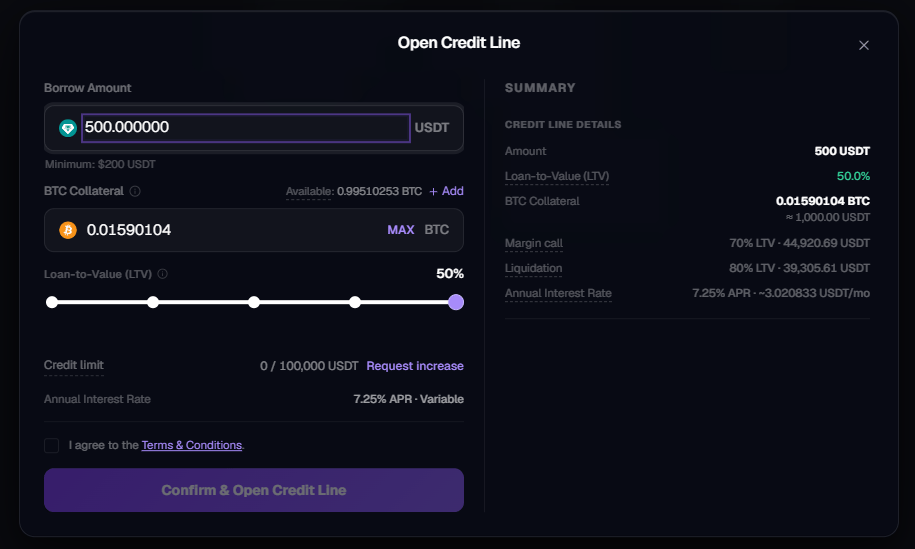 ### Summary panel
As you configure the loan, the **Summary** panel updates with:
* **Amount**: USDT to be disbursed.
* **Loan-to-Value (LTV)**: chosen ratio.
* **BTC Collateral**: BTC to be locked, plus its current USD equivalent.
* **Margin call**: the LTV threshold (**70%**) and the BTC price at which it would be reached.
* **Liquidation**: the LTV threshold (**80%**) and the BTC price at which it would be reached.
* **Annual Interest Rate**: current APR and the estimated monthly interest cost.
{/* IMAGE PLACEHOLDER, replace with:
### Summary panel
As you configure the loan, the **Summary** panel updates with:
* **Amount**: USDT to be disbursed.
* **Loan-to-Value (LTV)**: chosen ratio.
* **BTC Collateral**: BTC to be locked, plus its current USD equivalent.
* **Margin call**: the LTV threshold (**70%**) and the BTC price at which it would be reached.
* **Liquidation**: the LTV threshold (**80%**) and the BTC price at which it would be reached.
* **Annual Interest Rate**: current APR and the estimated monthly interest cost.
{/* IMAGE PLACEHOLDER, replace with:  */}
## 3. Accept the Terms & Conditions and confirm
Check the **I agree to the Terms & Conditions** box and click **Confirm & Open Credit Line**.
You will see a confirmation screen, **Credit Line Opened**: showing:
* **Borrowed**: USDT credited to your funding account.
* **Collateral**: BTC locked.
* **LTV**: final LTV at origination.
The USDT is credited **to your funding account immediately**. From there you can:
* Move it to your **trading account** to trade.
* **Withdraw** it off-platform.
* Use it for any other on-platform action available to your funding account.
*/}
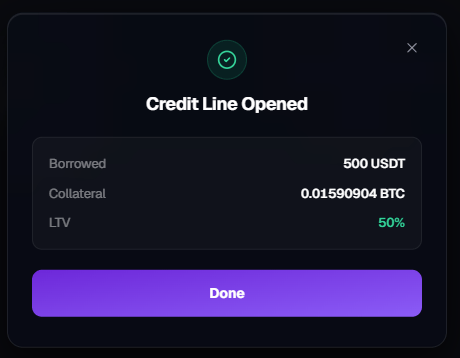
## 3. Accept the Terms & Conditions and confirm
Check the **I agree to the Terms & Conditions** box and click **Confirm & Open Credit Line**.
You will see a confirmation screen, **Credit Line Opened**: showing:
* **Borrowed**: USDT credited to your funding account.
* **Collateral**: BTC locked.
* **LTV**: final LTV at origination.
The USDT is credited **to your funding account immediately**. From there you can:
* Move it to your **trading account** to trade.
* **Withdraw** it off-platform.
* Use it for any other on-platform action available to your funding account.
 ## 4. Monitor your active credit line
Once a credit line is active, the **Credit Line** tab replaces the "open a credit line" view with your live position.
The top of the page shows:
* **Total Debt**: borrowed amount **plus accrued interest** to date, with the BTC equivalent.
* **Collateral**: BTC currently locked, with the USD equivalent.
The detailed row shows:
| Field | Meaning |
| -------------------- | ---------------------------------------------------------------- |
| **Asset** | The loan currency (USDT). |
| **Borrowed** | Principal amount of the loan, with current APR. |
| **Collateral** | BTC locked, marked **locked**. |
| **LTV** | Current loan-to-value, updated in real time. |
| **Margin call** | BTC price at which LTV reaches **70%**. |
| **Liquidation** | BTC price at which LTV reaches **80%**. |
| **Accrued Interest** | Interest added to total debt to date. Days open displayed below. |
## 4. Monitor your active credit line
Once a credit line is active, the **Credit Line** tab replaces the "open a credit line" view with your live position.
The top of the page shows:
* **Total Debt**: borrowed amount **plus accrued interest** to date, with the BTC equivalent.
* **Collateral**: BTC currently locked, with the USD equivalent.
The detailed row shows:
| Field | Meaning |
| -------------------- | ---------------------------------------------------------------- |
| **Asset** | The loan currency (USDT). |
| **Borrowed** | Principal amount of the loan, with current APR. |
| **Collateral** | BTC locked, marked **locked**. |
| **LTV** | Current loan-to-value, updated in real time. |
| **Margin call** | BTC price at which LTV reaches **70%**. |
| **Liquidation** | BTC price at which LTV reaches **80%**. |
| **Accrued Interest** | Interest added to total debt to date. Days open displayed below. |
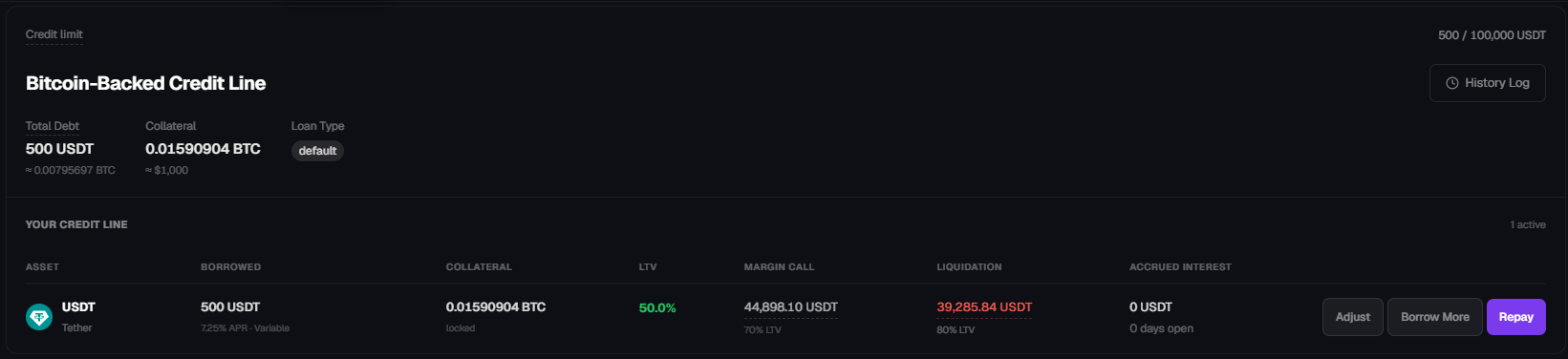 Three actions are available on the active credit line: **Adjust**, **Borrow More**, **Repay**.
**Same-day repayment incurs no interest.** Interest accrues per 24-hour cycle starting at loan creation. If you open and fully repay within the first 24 hours, no interest is charged.
### Loan status
From a user perspective, a credit line is either:
* **Active**: open with a positive outstanding debt. Visible in the Credit Line tab with the three action buttons.
* **Closed**: fully repaid (by you) or fully liquidated. Collateral has been unlocked and returned to the funding account, and the Credit Line tab returns to the "open a credit line" view.
### Notifications
Notifications are delivered by **email** to the address registered on your Roxom account. Critical events that trigger an email include the **margin call** at 70% LTV. Make sure your account email is current and that Roxom messages are not filtered to spam.
## 5. Adjust collateral
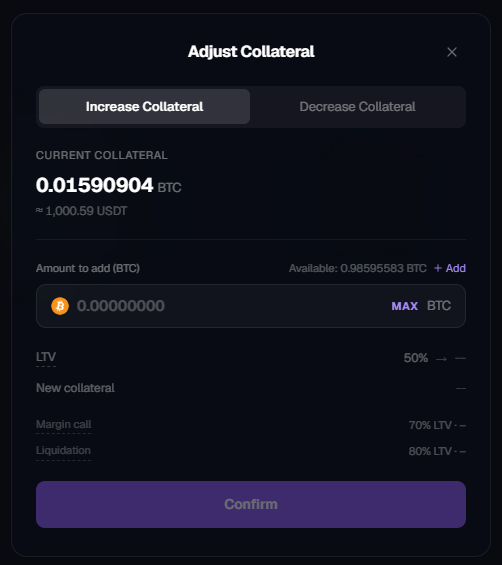
Click **Adjust** to open the **Adjust Collateral** modal. Two tabs are available:
* **Increase Collateral**: add BTC from your funding account to the existing loan. This **lowers your LTV** and pushes the margin call and liquidation prices further away. Use this to react to a price drop or to preempt a margin call.
* **Decrease Collateral**: withdraw part of the locked BTC back to your funding account. Allowed **only if the resulting LTV stays at or below 50%**. This is also how you capture the upside if BTC has appreciated since opening the loan, the LTV drops on its own, freeing collateral you can pull back.
The modal shows the current collateral and previews the new LTV, margin call price, and liquidation price before you confirm.
Three actions are available on the active credit line: **Adjust**, **Borrow More**, **Repay**.
**Same-day repayment incurs no interest.** Interest accrues per 24-hour cycle starting at loan creation. If you open and fully repay within the first 24 hours, no interest is charged.
### Loan status
From a user perspective, a credit line is either:
* **Active**: open with a positive outstanding debt. Visible in the Credit Line tab with the three action buttons.
* **Closed**: fully repaid (by you) or fully liquidated. Collateral has been unlocked and returned to the funding account, and the Credit Line tab returns to the "open a credit line" view.
### Notifications
Notifications are delivered by **email** to the address registered on your Roxom account. Critical events that trigger an email include the **margin call** at 70% LTV. Make sure your account email is current and that Roxom messages are not filtered to spam.
## 5. Adjust collateral
Click **Adjust** to open the **Adjust Collateral** modal. Two tabs are available:
* **Increase Collateral**: add BTC from your funding account to the existing loan. This **lowers your LTV** and pushes the margin call and liquidation prices further away. Use this to react to a price drop or to preempt a margin call.
* **Decrease Collateral**: withdraw part of the locked BTC back to your funding account. Allowed **only if the resulting LTV stays at or below 50%**. This is also how you capture the upside if BTC has appreciated since opening the loan, the LTV drops on its own, freeing collateral you can pull back.
The modal shows the current collateral and previews the new LTV, margin call price, and liquidation price before you confirm.
 ### Change your target LTV
There is **no direct "edit target LTV" control** once a credit line is open. You change your effective LTV by combining the existing actions:
| Direction | Action | Effect on LTV |
| ----------------------------- | -------------------------------- | ----------------------------------------------------------------- |
| **Lower LTV** (less risk) | **Adjust → Increase Collateral** | More BTC backing the same debt → LTV drops. |
| **Lower LTV** (less risk) | **Repay** (partial or full) | Less debt against the same collateral → LTV drops. |
| **Raise LTV** (more leverage) | **Borrow More** | More debt against the same collateral → LTV rises, capped at 50%. |
| **Raise LTV** (more leverage) | **Adjust → Decrease Collateral** | Less BTC backing the same debt → LTV rises, capped at 50%. |
In all cases, the modal previews the **new LTV**, **new margin call price**, and **new liquidation price** before you confirm, so you can effectively dial your LTV to any target between 0% and 50%.
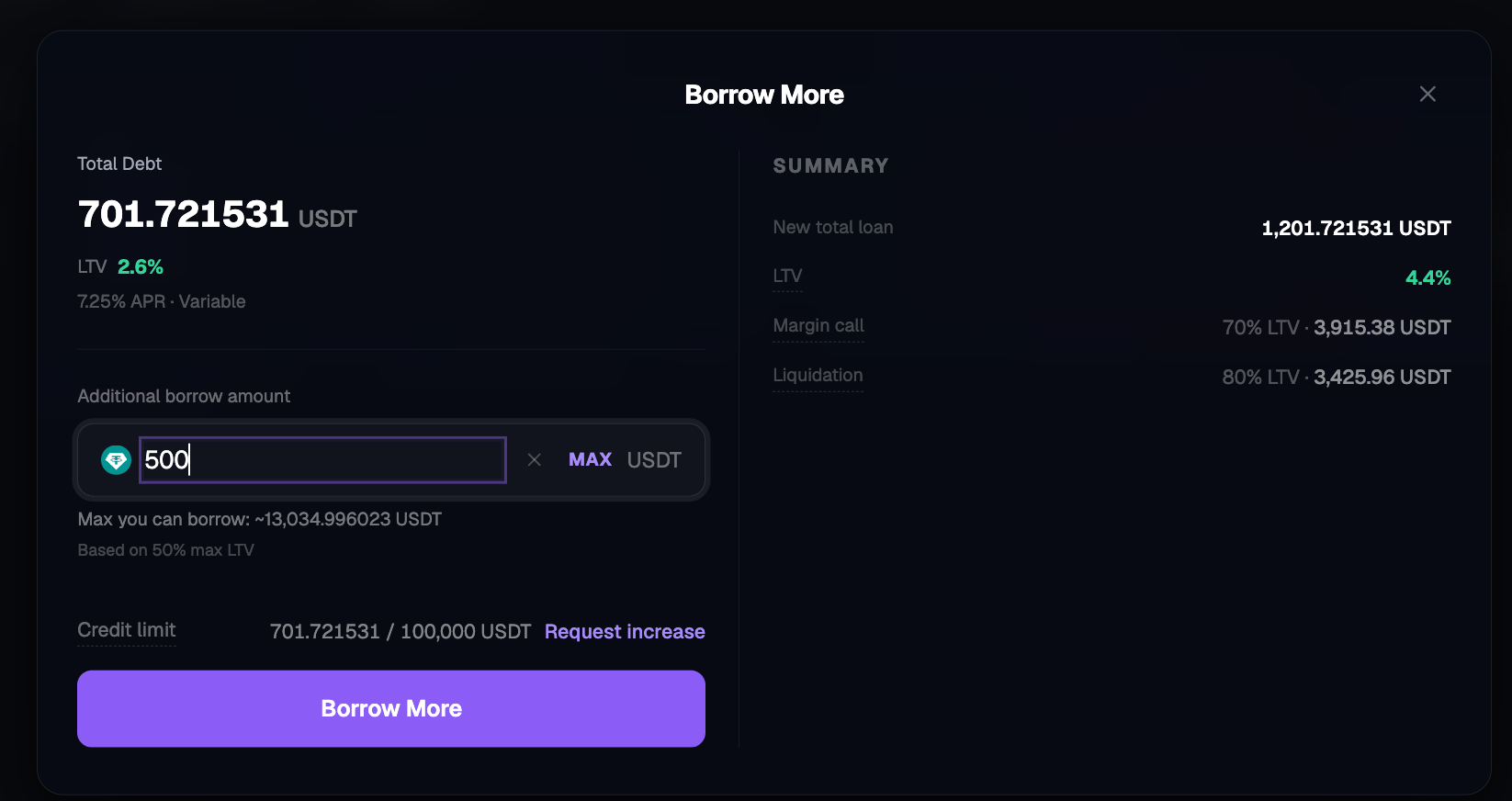
## 6. Borrow more
Click **Borrow More** to increase your outstanding debt against the same collateral.
* **Minimum additional borrow:** USDT 200.
* **Maximum:** capped by **50% LTV** on your current collateral and by your account-level **credit limit** (default USDT 200,000).
* The modal shows **Max you can borrow** based on the 50% LTV cap. Your remaining headroom under the credit limit is shown as `used / total USDT`.
Confirming Borrow More disburses the additional USDT to your funding account and recalculates LTV, margin call, and liquidation prices.
### Change your target LTV
There is **no direct "edit target LTV" control** once a credit line is open. You change your effective LTV by combining the existing actions:
| Direction | Action | Effect on LTV |
| ----------------------------- | -------------------------------- | ----------------------------------------------------------------- |
| **Lower LTV** (less risk) | **Adjust → Increase Collateral** | More BTC backing the same debt → LTV drops. |
| **Lower LTV** (less risk) | **Repay** (partial or full) | Less debt against the same collateral → LTV drops. |
| **Raise LTV** (more leverage) | **Borrow More** | More debt against the same collateral → LTV rises, capped at 50%. |
| **Raise LTV** (more leverage) | **Adjust → Decrease Collateral** | Less BTC backing the same debt → LTV rises, capped at 50%. |
In all cases, the modal previews the **new LTV**, **new margin call price**, and **new liquidation price** before you confirm, so you can effectively dial your LTV to any target between 0% and 50%.
## 6. Borrow more
Click **Borrow More** to increase your outstanding debt against the same collateral.
* **Minimum additional borrow:** USDT 200.
* **Maximum:** capped by **50% LTV** on your current collateral and by your account-level **credit limit** (default USDT 200,000).
* The modal shows **Max you can borrow** based on the 50% LTV cap. Your remaining headroom under the credit limit is shown as `used / total USDT`.
Confirming Borrow More disburses the additional USDT to your funding account and recalculates LTV, margin call, and liquidation prices.
 ### Credit limit and increases
Each user has an account-level **credit limit**: a ceiling on total outstanding USDT debt across the lifetime of the credit line, independent of the 50% LTV per-loan cap. It is displayed in the Open Credit Line and Borrow More modals as `used / total USDT` (for example, `1,000 / 200,000 USDT`). The default credit limit is **USDT 200,000** per account.
If you need a higher cap, click **Increase →** next to the credit limit. This opens a **request a credit limit increase** flow that contacts our support team. Increases are subject to available liquidity and internal review, they are not granted automatically.
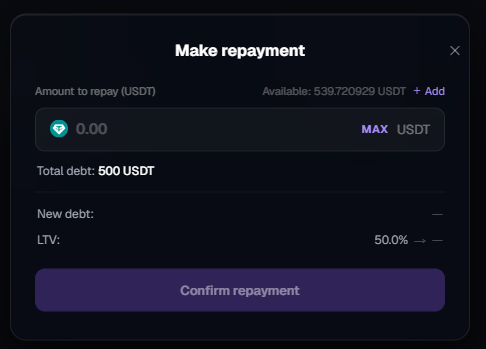
## 7. Repay
Click **Repay** to open the **Make repayment** modal.
* Enter any amount up to the total outstanding debt.
* **MAX** repays the full debt.
* The modal previews the **new debt** and **new LTV** before confirmation.
### Credit limit and increases
Each user has an account-level **credit limit**: a ceiling on total outstanding USDT debt across the lifetime of the credit line, independent of the 50% LTV per-loan cap. It is displayed in the Open Credit Line and Borrow More modals as `used / total USDT` (for example, `1,000 / 200,000 USDT`). The default credit limit is **USDT 200,000** per account.
If you need a higher cap, click **Increase →** next to the credit limit. This opens a **request a credit limit increase** flow that contacts our support team. Increases are subject to available liquidity and internal review, they are not granted automatically.
## 7. Repay
Click **Repay** to open the **Make repayment** modal.
* Enter any amount up to the total outstanding debt.
* **MAX** repays the full debt.
* The modal previews the **new debt** and **new LTV** before confirmation.
 Repayment behavior:
* **Partial repayment**: reduces total debt and LTV. Collateral **stays locked**. Payments are applied to **accrued interest first**, then principal.
* **Full repayment**: closes the credit line. **Collateral is unlocked** and returned to your **funding account** immediately.
### How to repay if you do not have USDT
The debt is denominated in **USDT** and must be repaid in USDT held in your **funding account**. If you do not have enough USDT:
* **Deposit USDT** into your funding account.
* **Sell other assets** on Roxom (including, if you choose, BTC you hold outside the collateral) to obtain USDT, then repay.
* **Move USDT in from your trading account** if you hold it there.
The Repay modal shows the USDT **Available** in your funding account. If the amount is below the value you enter, you must top up first.
### After full repayment
The Credit Line tab returns to the "open a credit line" view. You can open a new credit line whenever you want, **only one active credit line per user** at a time, but **no cooldown** between credit lines once the previous one is closed.
## History Log
The **History Log** tab (top right of the Loans section) is the full audit trail of your credit line activity. Each row shows:
* **Date & time** of the event.
* **Type** of event, for example: **Interest Accrued**, **Collateral Liquidated**, **Liquidation Fee**, **Loan Liquidated**, repayments, top-ups, borrow-more, and opens / closes.
* **Amount** (in BTC or USDT, depending on the event).
* **Impact**: short description (for example, "Seized for liquidation", "Liquidation fee", "Interest accrued", "Liquidated: collateral fully seized").
* **Loan**: the loan ID associated with the event.
* **Status**: typically **Completed**.
Filters at the top let you narrow by event type, loan, and time range.
## Where to look in the app
| Screen | Purpose |
| ---------------------------------------------------------------------- | ------------------------------------------------------------------------------------------------- |
| [**Portfolio menu → Loans**](https://roxom.com/exchange/account/loans) | Entry point. Lists available assets or your active credit line. |
| **Credit Line tab** | Live monitoring of debt, collateral, LTV, margin call price, liquidation price, accrued interest. |
| **History Log tab** | Full audit trail of accruals, repayments, top-ups, borrow-more, and liquidations. |
| **Open Credit Line modal** | Size the loan: borrow amount, collateral, LTV. |
| **Credit Line Opened confirmation** | Final summary after creation. |
| **Adjust Collateral modal** | Increase or decrease locked BTC. |
| **Borrow More modal** | Increase outstanding debt against existing collateral. Includes credit-limit increase request. |
| **Make repayment modal** | Partial or full repayment. |
## Related reading
Why the product exists and how the economics work.
APR, limits, fees, and currency.
Thresholds and what happens if BTC drops.
How interest accrues and how to repay.
## Need help?
Still have questions? You can speak to **Roxy**, our AI support assistant, available 24/7 in the chat bubble at the bottom right of your screen.
You can also contact our support team directly at [help@roxom.com](mailto:help@roxom.com).
This content is for informational purposes only and does not constitute investment advice. Trading digital assets involves significant risk, including the potential loss of your entire investment. Please review our [Risk Notice](/legal/risk-notice) before trading.
Repayment behavior:
* **Partial repayment**: reduces total debt and LTV. Collateral **stays locked**. Payments are applied to **accrued interest first**, then principal.
* **Full repayment**: closes the credit line. **Collateral is unlocked** and returned to your **funding account** immediately.
### How to repay if you do not have USDT
The debt is denominated in **USDT** and must be repaid in USDT held in your **funding account**. If you do not have enough USDT:
* **Deposit USDT** into your funding account.
* **Sell other assets** on Roxom (including, if you choose, BTC you hold outside the collateral) to obtain USDT, then repay.
* **Move USDT in from your trading account** if you hold it there.
The Repay modal shows the USDT **Available** in your funding account. If the amount is below the value you enter, you must top up first.
### After full repayment
The Credit Line tab returns to the "open a credit line" view. You can open a new credit line whenever you want, **only one active credit line per user** at a time, but **no cooldown** between credit lines once the previous one is closed.
## History Log
The **History Log** tab (top right of the Loans section) is the full audit trail of your credit line activity. Each row shows:
* **Date & time** of the event.
* **Type** of event, for example: **Interest Accrued**, **Collateral Liquidated**, **Liquidation Fee**, **Loan Liquidated**, repayments, top-ups, borrow-more, and opens / closes.
* **Amount** (in BTC or USDT, depending on the event).
* **Impact**: short description (for example, "Seized for liquidation", "Liquidation fee", "Interest accrued", "Liquidated: collateral fully seized").
* **Loan**: the loan ID associated with the event.
* **Status**: typically **Completed**.
Filters at the top let you narrow by event type, loan, and time range.
## Where to look in the app
| Screen | Purpose |
| ---------------------------------------------------------------------- | ------------------------------------------------------------------------------------------------- |
| [**Portfolio menu → Loans**](https://roxom.com/exchange/account/loans) | Entry point. Lists available assets or your active credit line. |
| **Credit Line tab** | Live monitoring of debt, collateral, LTV, margin call price, liquidation price, accrued interest. |
| **History Log tab** | Full audit trail of accruals, repayments, top-ups, borrow-more, and liquidations. |
| **Open Credit Line modal** | Size the loan: borrow amount, collateral, LTV. |
| **Credit Line Opened confirmation** | Final summary after creation. |
| **Adjust Collateral modal** | Increase or decrease locked BTC. |
| **Borrow More modal** | Increase outstanding debt against existing collateral. Includes credit-limit increase request. |
| **Make repayment modal** | Partial or full repayment. |
## Related reading
Why the product exists and how the economics work.
APR, limits, fees, and currency.
Thresholds and what happens if BTC drops.
How interest accrues and how to repay.
## Need help?
Still have questions? You can speak to **Roxy**, our AI support assistant, available 24/7 in the chat bubble at the bottom right of your screen.
You can also contact our support team directly at [help@roxom.com](mailto:help@roxom.com).
This content is for informational purposes only and does not constitute investment advice. Trading digital assets involves significant risk, including the potential loss of your entire investment. Please review our [Risk Notice](/legal/risk-notice) before trading.