After completing a swap using One-Click Trade, you may want to verify where your assets appear and how to review related activity.
This article explains where to find your tokenized assets, what each value means, and how to review activity generated by One-Click Trade swaps.
Where can I see my tokenized assets?
Once a swap is confirmed, your tokenized assets are credited immediately to your Unified Trading Account (UTA).
How to view your assets
- Go to Your Portfolio
- Open the Assets tab
Here you’ll see all assets held in your UTA, including tokenized stocks.
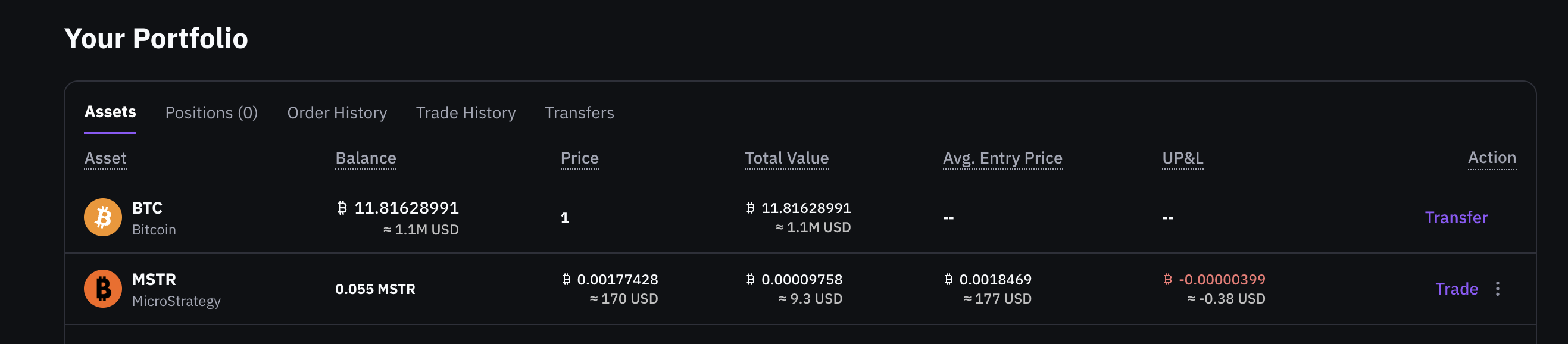
For each tokenized asset, the portfolio view shows:
- Balance
The total number of tokenized shares you currently hold.
- Price
The current market price of the asset, quoted in BTC (or SATS).
- Total Value
The total value of your position, calculated as:
Balance × current market price.
- UP&L (Unrealized P&L)
Your unrealized profit or loss based on the current price.
This value changes as the market price moves.
Portfolio values update automatically as prices change.
Where can I see my activity?
One-Click Trade swaps do not appear in the traditional Order History, since they are executed as instant swaps.
To review activity related to a specific tokenized asset:
- Go to Your Portfolio
- Open the Assets tab
- Locate the asset you want to review
- In the Action column, click the menu (three dots)
- Select View Full Details
This opens the Transaction Log filtered for that asset, showing all related balance movements.
You can also access the full Transaction Log from your Unified Trading Account to review all account activity.

Notifications
After each completed swap:
- A confirmation appears in the Notification Center
- A confirmation email is sent to your registered email address
These notifications provide quick confirmation, while the Transaction Log serves as the full activity record.
Key takeaways
- Tokenized assets appear instantly in UTA → Assets after a swap
- Portfolio values update automatically based on market prices
- One-Click Trade swaps do not appear in Order History
- Activity can be reviewed per asset via View Full Details
- Notifications and emails confirm each completed swap
Last modified on March 16, 2026

