

Setting up TP/SL on an open position
- Go to the Open Positions tab at the bottom of the trading interface
- Find the position you want to configure
- Click the Add button in the TP/SL column

- In the TP/SL modal, configure your orders:
- Take Profit Price: The price at which you want to secure profits
- Stop Loss Price: The price at which you want to limit losses
- Amount: Currently closes the entire position (partial close coming soon)
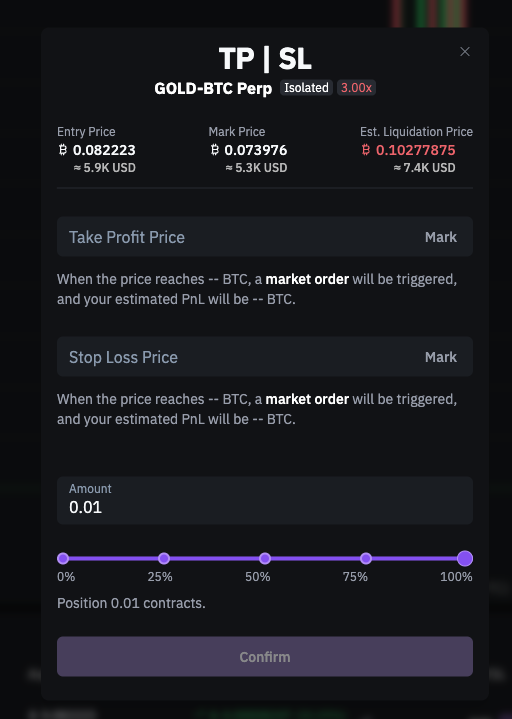
- Click Confirm to save your configuration
You can set just a Take Profit, just a Stop Loss, or both at the same time.
How TP/SL orders work
When the market price reaches your configured trigger price:- A market order is automatically placed to close your position
- The order executes at the best available price
Editing or removing TP/SL orders
To modify your TP/SL configuration:- Go to Open Positions
- Click the TP/SL value for your position
- In the modal, you can:
- Edit: Change the trigger price or amount
- Remove: Clear the field and save to delete the order
Viewing TP/SL orders
Your active TP/SL orders appear in two places:You can cancel TP/SL orders from the Open Orders tab, but to edit them you must use the Open Positions modal.
Important points
- TP/SL orders are always linked to a specific position
- When triggered, they create a market order at the trigger price
- If you close the position manually, associated TP/SL orders are automatically cancelled
Related articles
How to place and manage an order on Roxom
Open article
Understanding your margin ratio and liquidation price
Open article