

BTC, USDC, and USDT can all be transferred to the UTA. In the UTA, trading pairs are quoted in BTC or USDT. USDC is a base-only asset: you can sell USDC for BTC or for USDT using One-Click Trade (Swap), but there are no pairs quoted against USDC.
Transfer from Funding Account to UTA
In the UTA you can use BTC, USDC, or USDT for One-Click Trade: BTC trades against crypto and tokenized equities, USDC can be sold for BTC or USDT, and USDT can be bought or sold against BTC.1
Go to Portfolio
From the main navigation, go to Portfolio.
2
Open your Funding Account
Click on Funding Account.
3
Start the transfer
Click Transfer and set:
- From: Funding
- To: Unified Trading
4
Select the currency
Choose BTC, USDC, or USDT.
5
Enter the amount
Enter the amount you want to transfer.
6
Confirm
Click Confirm Transfer. The funds appear in your UTA immediately.
Transfer from UTA to Funding Account
Move funds back to your Funding Account when you want to withdraw or subscribe them to Earn.1
Go to Portfolio
From the main navigation, go to Portfolio.
2
Open your UTA
Click on Trading Account.
3
Start the transfer
Click Transfer and set:
- From: Trading Account
- To: Funding Account
4
Enter the amount
Enter the BTC, USDC, or USDT amount you want to transfer back.
5
Confirm
Click Confirm Transfer. The transferred currency appears in your Funding Account immediately.
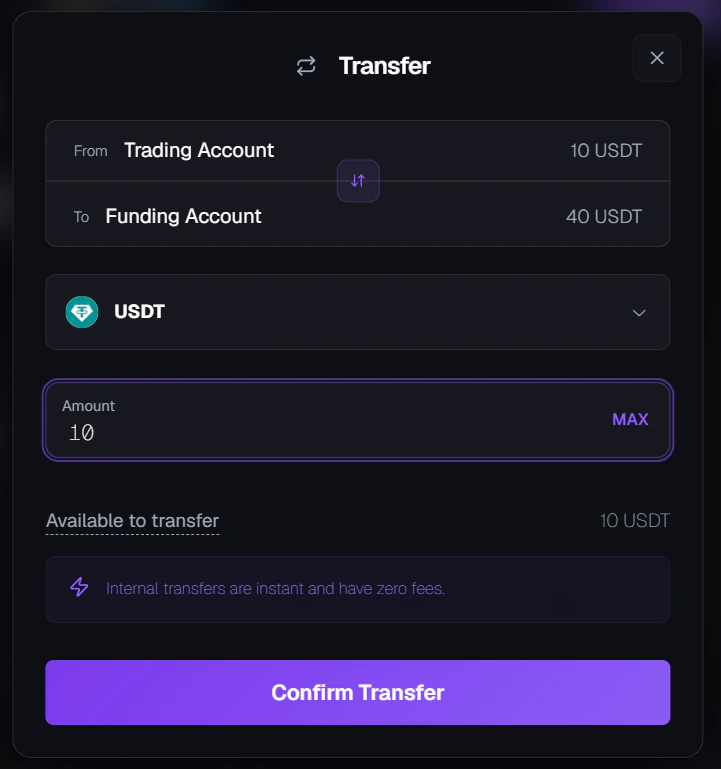
Transfer modal, moving funds from Unified Trading to Funding.
Common questions
Is there a fee for transferring between accounts?
Is there a fee for transferring between accounts?
No. Transfers between your Funding Account and UTA are completely free.
How long does a transfer take?
How long does a transfer take?
Transfers are instant. Your balance updates immediately.
Can I transfer USDC or USDT to the UTA?
Can I transfer USDC or USDT to the UTA?
Yes. You can transfer USDC and USDT to the UTA. In One-Click Trade, trading pairs are quoted in BTC or USDT: you can sell USDC for BTC or for USDT, and buy or sell USDT against BTC. There are no pairs quoted against USDC. See One-Click Trade (Swap) for details.
Do internal transfers count toward my withdrawal limit?
Do internal transfers count toward my withdrawal limit?
No. Transfers between your Funding Account and UTA are internal account movements and do not count toward your daily withdrawal limit.
Can I transfer BTC that's being used as margin?
Can I transfer BTC that's being used as margin?
No. BTC assigned as margin to open positions is locked. You need to close or reduce those positions to free up the BTC.
Need help?
Still have questions? You can speak to Roxy, our AI support assistant, available 24/7 in the chat bubble at the bottom right of your screen. You can also contact our support team directly at help@roxom.com.Related articles
Understanding your Roxom accounts
Open article
How to deposit crypto
Open article
How to withdraw crypto
Open article