

Prerequisites
Before placing a trade, make sure that:- You have Bitcoin (BTC) (or another supported asset) available in your Unified Trading Account (UTA)
- For tokenized equities: the U.S. market must be open (Monday-Friday, 9:30 AM-4:00 PM EST)
- For crypto assets (ETH, SOL, USDC, USDT): available 24/7
Deposited USDC or USDT? In One-Click Trade, trading pairs are quoted in BTC or USDT: you can sell USDC for BTC or for USDT, and buy or sell USDT against BTC. There are no pairs quoted against USDC. To buy tokenized stocks or ETFs, swap your stablecoins to BTC first, then swap BTC into the target asset.Example flow: USDT → BTC → AAPL (or any other asset)
How the One-Click Trade modal works
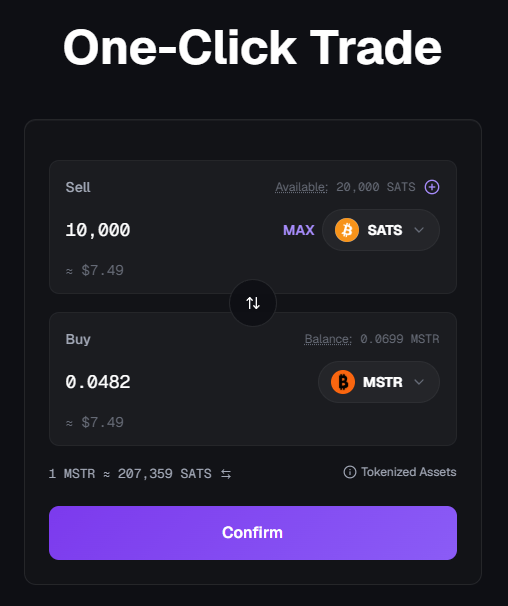
One-Click Trade uses a single swap-style modal with two sections:- Sell (top): the asset you want to swap from. The dropdown only shows assets you currently hold. Your spendable balance is shown next to Available, and a
+button lets you quickly deposit more of that asset. - Buy (bottom): the asset you want to receive. Your current holdings of that asset are shown next to Balance.
≈ $99.62). A swap arrow (↑↓) between the two sections lets you flip the direction in one click.
At the bottom of the modal you’ll see:
- The current indicative exchange rate (for example,
1 STRC ≈ 0.00133091 BTC), with a small toggle (↹) to invert the quote direction. - A Tokenized Assets info link with details about the underlying instruments.
- The main Confirm action button.
BTC is the hub for most trades. Trading pairs are quoted in BTC or USDT, so every One-Click Trade swap has BTC or USDT on one side.
- If you Sell BTC, you can Buy any supported asset (crypto or tokenized equity).
- If you Sell any other asset (STRC, ETH, SOL, AAPL, SPY, etc.), you can only Buy BTC.
- USDC is a base-only asset: you can sell USDC for BTC or for USDT, but there are no pairs quoted against USDC. The USDC/USDT pair is not exactly 1:1: both are USD-pegged stablecoins but their market prices fluctuate slightly around 1.00, so orders execute at live market prices.
How to buy a tokenized asset
Step 1: Select assets and amount
- Navigate to the One-Click Trade interface.
- In Sell (top), select BTC from the dropdown and enter the amount you want to spend.
- Click MAX to use your full available balance, or
+to deposit more BTC first. - The USD value of the amount you’re selling appears below the input (for example,
≈ $99.62).
- Click MAX to use your full available balance, or
- In Buy (bottom), use the dropdown to search for and select the asset you want to buy (for example, AAPL or STRC).
1 STRC ≈ 0.00133091 BTC) is shown at the bottom of the modal.
Step 2: Review the estimate
- The interface displays an estimated amount of the asset you will receive based on the current market price.
- Click Confirm to proceed.
This amount is an estimate, not a guaranteed price.
Step 3: Confirm the quote
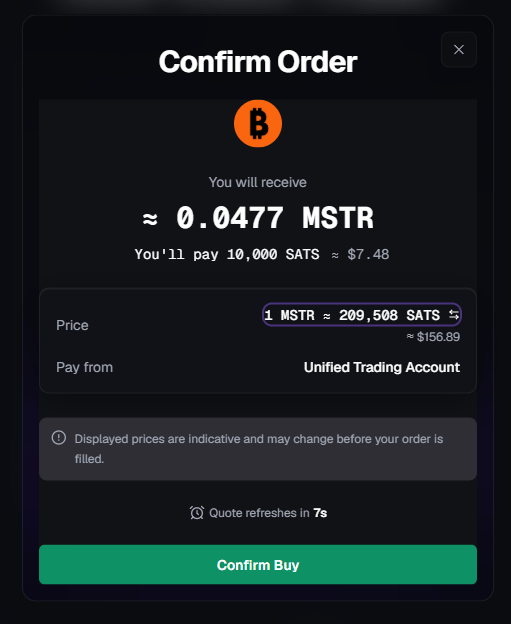
- A Confirm window appears showing the execution quote for the swap.
- The quote is time-sensitive and refreshes automatically.
- You have 10 seconds to accept the current quote.
- Click Confirm before the timer expires to execute the swap.
Step 4: Execution and confirmation
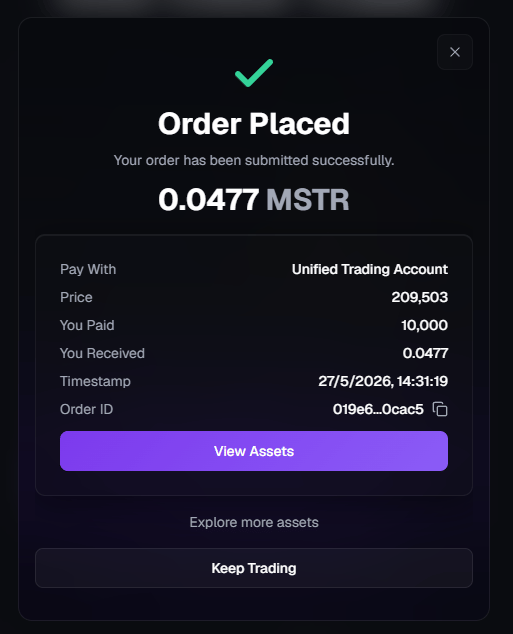
- Once confirmed, the swap executes instantly.
- You’ll see a confirmation screen showing the final execution details, including:
- The final amount received
- The exact BTC (or SATS) paid
- The final execution price
- Timestamp and reference ID
- A confirmation appears in the Notification Center
- A confirmation email is sent to your registered email address
- Your asset is immediately available in your Unified Trading Account (UTA)
How to sell a tokenized asset
Selling follows the same swap flow as buying, just with the direction reversed. You can either:- Click the swap arrow (↑↓) between the Sell and Buy sections to flip the direction, or
- Open the Sell dropdown and pick the asset you want to sell (only assets you currently hold appear).
What changes when selling
- Sell (top) shows the asset you currently hold (for example, STRC, AAPL, ETH). Your position appears next to Available.
- Buy (bottom) is locked to BTC: when selling any non-BTC asset, BTC is the only available output. Your current BTC holdings appear next to Balance.
- Enter the amount to sell or click MAX to sell your full position. The USD estimate updates live in both sections.
- You review an estimate
- You confirm a time-sensitive quote
- The swap executes instantly after confirmation
Execution and confirmation (sell)
Once you confirm the quote:- The swap executes instantly
- You’ll see a confirmation screen with the final execution details
- The final BTC amount is credited to your Unified Trading Account (UTA)
- A confirmation appears in the Notification Center
- A confirmation email is sent to your registered email address
Are there any trading fees?
One-Click Trade does not charge explicit trading fees.The price shown in the confirmation quote reflects the execution price of the swap, with no additional charges applied after confirmation.
Key takeaway
- One-Click Trade uses a single swap modal: Sell on top, Buy on bottom, with a direction-flip arrow
- BTC is always one side of the trade: sell BTC to buy any asset, or sell any asset to receive BTC
- Buying and selling use the same swap flow: only the direction changes
- Quotes, timing, execution, and confirmations behave identically
- No fees apply to buy or sell swaps