

TL;DR
If you already have a bitcoin-backed loan with another lender, you can move it to a BLOC instead of opening a new one from scratch. Start at roxom.com/refi, message the refinance hotline on WhatsApp at +1 (682) 271-7956, or see How to refinance your loan.
Before you start
1
Complete KYC verification
You must have successfully completed the KYC verification process on your Roxom account before you can open a credit line.
2
Have BTC available in your funding account
Only the available BTC in your funding account counts as eligible collateral. BTC held in the trading account, in open orders, or already locked in another product is not eligible.BTC used as collateral stops earning Auto-Earn yield while it is locked. Auto-Earn pays on the daily minimum available BTC balance, so locking BTC as collateral is treated like moving it out of the available balance.
3
Know your target LTV
A lower LTV at origination requires more BTC as collateral but gives you more headroom against price drops. The maximum LTV at origination is 50%.
1. Open the Loans section
From the app header, open the Portfolio menu. At the bottom of the Portfolio panel, click Loans. The Loans section has two tabs:- Credit Line: the main view where you open, monitor, and manage your active loan.
- History Log: full activity record (covered in History Log below).
- Annual Interest Rate: current APR, variable (currently 7.25%).
- Duration: Open Ended. The loan has no maturity date.
- Max LTV: maximum loan-to-value at origination (50%).
- Liquidation: the LTV at which the system triggers a partial liquidation (80%).
2. Configure the credit line
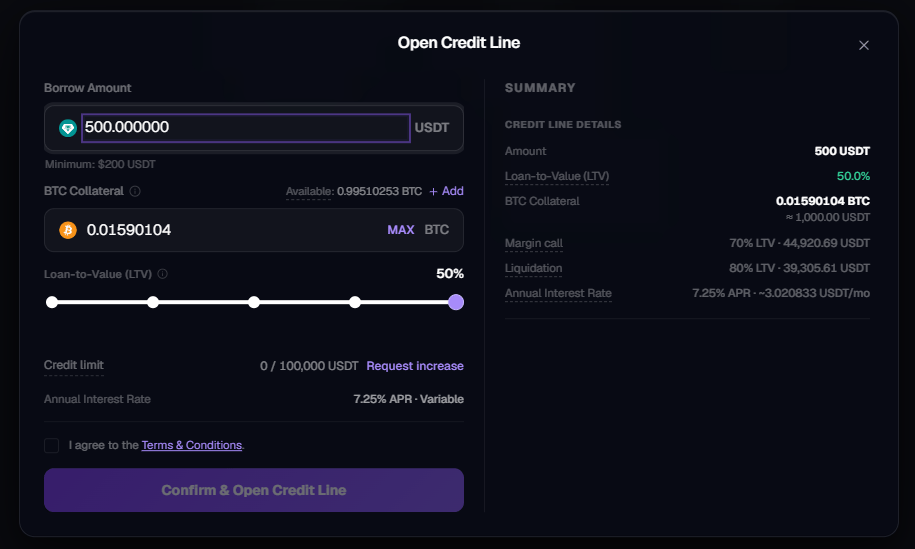
The Open Credit Line modal lets you size the loan. The two inputs are linked: changing one updates the other and recalculates margin call and liquidation prices in real time. You can simulate any amount even if you do not currently hold enough BTC: the modal still updates the summary so you can see what the loan would look like. If your funding account does not have enough BTC to back the requested borrow amount at the chosen LTV, the modal shows an “Insufficient BTC in your Funding Account” warning and the Confirm & Open Credit Line button stays disabled until the gap is covered.Borrow Amount
Borrow Amount
Enter the amount you want to borrow, in the stablecoin of the credit line you opened (USDT or USDC).
- Minimum: 200 USDT or 200 USDC.
- Maximum: subject to two caps, 50% LTV against your eligible BTC collateral, and the credit limit for that credit line (default 200,000 per credit line; USDT and USDC are counted independently, so the combined default cap is 400,000 — see Credit limit and increases).
BTC Collateral
BTC Collateral
The system shows how much BTC will be locked as collateral. The amount depends on the target LTV you select.
- Available shows the BTC in your funding account eligible to be used as collateral.
- MAX uses the maximum eligible amount.
- + Add opens a deposit flow so you can fund the account with more BTC without leaving the modal.
Loan-to-Value (LTV)
Loan-to-Value (LTV)
Use the slider to set your target LTV at origination (1%-50%).
LTV (Loan-to-Value) measures how much you owe relative to your collateral value. A lower LTV means a healthier position. Your LTV rises if BTC price drops or as interest accrues. If it exceeds certain thresholds, you may need to add collateral or make a repayment to avoid liquidation.Lowering the LTV increases the BTC collateral required and pushes both the margin call price and the liquidation price further away from the current BTC price.
Summary panel
As you configure the loan, the Summary panel updates with:- Amount: USDT or USDC to be disbursed.
- Loan-to-Value (LTV): chosen ratio.
- BTC Collateral: BTC to be locked, plus its current USD equivalent.
- Margin call: the LTV threshold (70%) and the BTC price at which it would be reached.
- Liquidation: the LTV threshold (80%) and the BTC price at which it would be reached.
- Annual Interest Rate: current APR and the estimated monthly interest cost.
3. Accept the Terms & Conditions and confirm
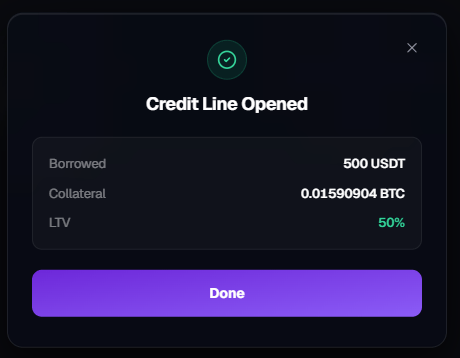
Check the I agree to the Terms & Conditions box and click Confirm & Open Credit Line. You will see a confirmation screen, Credit Line Opened: showing:- Borrowed: USDT or USDC credited to your funding account.
- Collateral: BTC locked.
- LTV: final LTV at origination.
- Move it to your trading account to trade.
- Withdraw it off-platform.
- Use it for any other on-platform action available to your funding account.
USDC does not yet have direct trading pairs on Roxom. To trade with a USDC loan on the platform, first convert the USDC to USDT or BTC in One-Click Trade, and then use those funds to open the position.
4. Monitor your active credit line
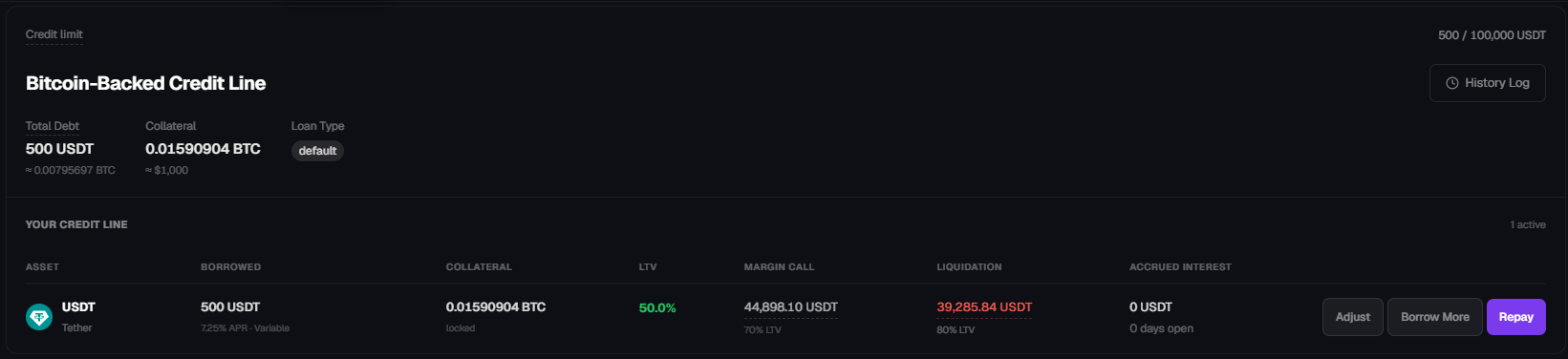
Once a credit line is active, the Credit Line tab replaces the “open a credit line” view with your live position. The top of the page shows:- Total Debt: borrowed amount plus accrued interest to date, with the BTC equivalent.
- Collateral: BTC currently locked, with the USD equivalent.
Loan status
From a user perspective, a credit line is either:- Active: open with a positive outstanding debt. Visible in the Credit Line tab with the three action buttons.
- Closed: fully repaid (by you) or fully liquidated. Collateral has been unlocked and returned to the funding account, and the Credit Line tab returns to the “open a credit line” view.
Notifications
Notifications are delivered by email to the address registered on your Roxom account. Critical events that trigger an email include the margin call at 70% LTV. Make sure your account email is current and that Roxom messages are not filtered to spam.5. Adjust collateral
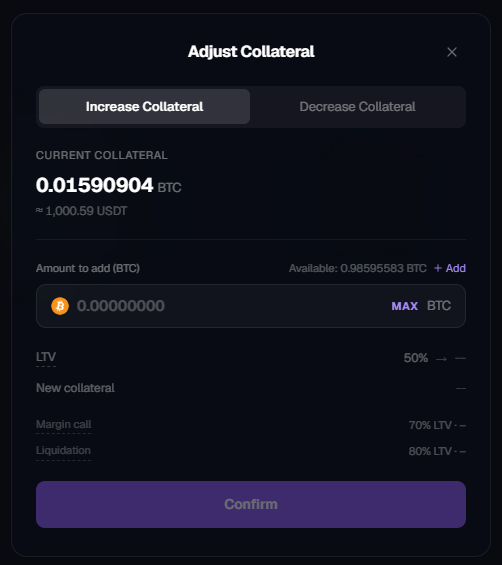
Click Adjust to open the Adjust Collateral modal. Two tabs are available:- Increase Collateral: add BTC from your funding account to the existing loan. This lowers your LTV and pushes the margin call and liquidation prices further away. Use this to react to a price drop or to preempt a margin call.
- Decrease Collateral: withdraw part of the locked BTC back to your funding account. Allowed only if the resulting LTV stays at or below 50%. This is also how you capture the upside if BTC has appreciated since opening the loan, the LTV drops on its own, freeing collateral you can pull back.
Change your target LTV
There is no direct “edit target LTV” control once a credit line is open. You change your effective LTV by combining the existing actions:
In all cases, the modal previews the new LTV, new margin call price, and new liquidation price before you confirm, so you can effectively dial your LTV to any target between 0% and 50%.
6. Borrow more
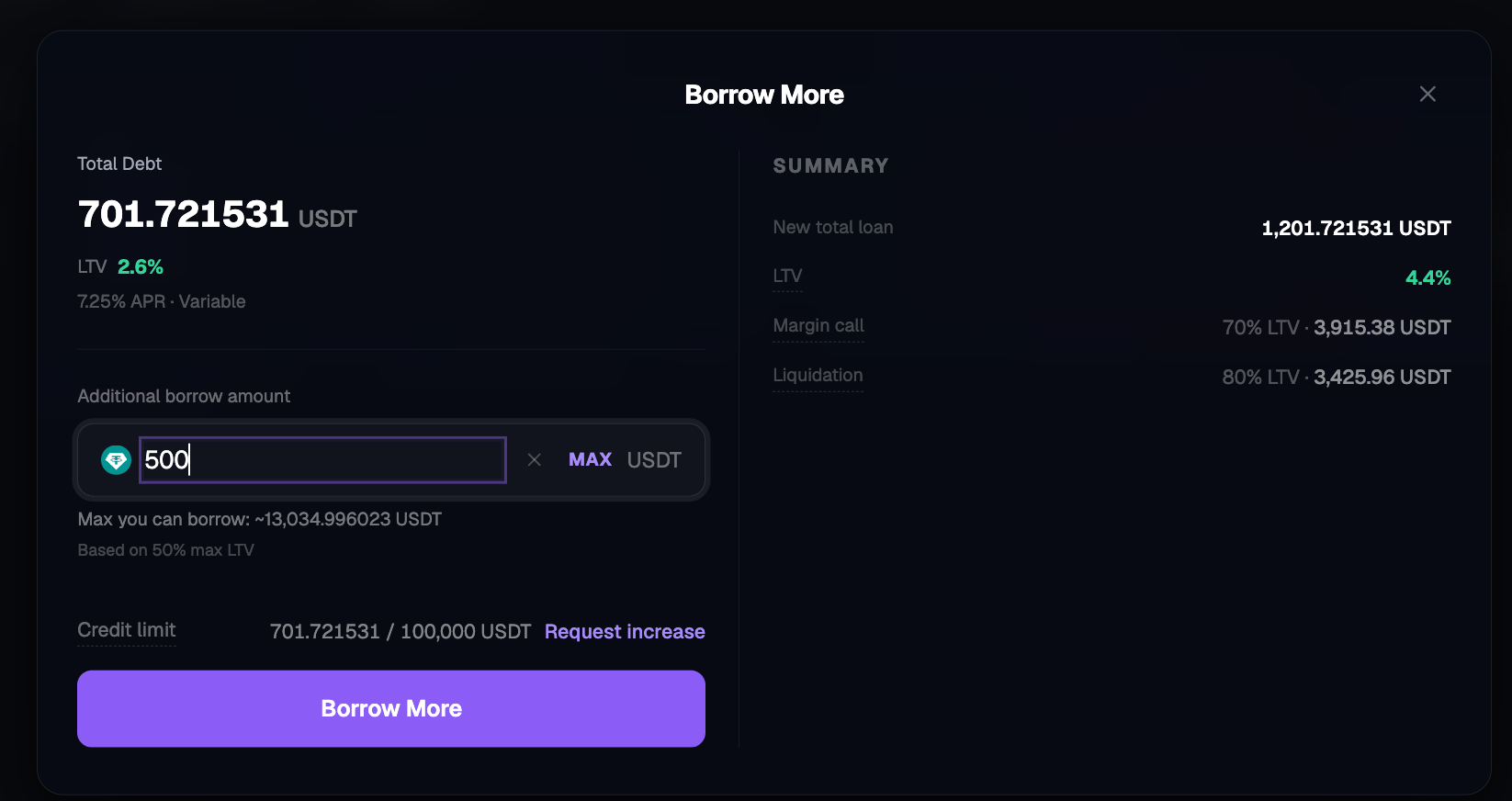
Click Borrow More on the credit line you want to increase (USDT or USDC) to add debt against the same collateral.- Minimum additional borrow: 200 USDT or 200 USDC.
- Maximum: capped by 50% LTV on your current collateral and by the credit limit for that credit line (default 200,000 per credit line, counted independently for USDT and USDC).
- The modal shows Max you can borrow based on the 50% LTV cap. Your remaining headroom under the credit limit is shown as
used / totalin the corresponding stablecoin.
Credit limit and increases
Each credit line has its own credit limit: a ceiling on total outstanding debt across its lifetime, independent of the 50% LTV per-loan cap. It is displayed in the Open Credit Line and Borrow More modals asused / total in the credit line’s currency (for example, 1,000 / 200,000 USDT or 1,000 / 200,000 USDC). The default credit limit is 200,000 per credit line, so a user with both a USDT and a USDC credit line has a combined default cap of 400,000.
If you need a higher cap, click Increase → next to the credit limit. This opens a request a credit limit increase flow that contacts our support team. Increases are subject to available liquidity and internal review, they are not granted automatically. Increases are requested per credit line.
7. Repay
Click Repay to open the Make repayment modal.- Enter any amount up to the total outstanding debt.
- MAX repays the full debt.
- The modal previews the new debt and new LTV before confirmation.
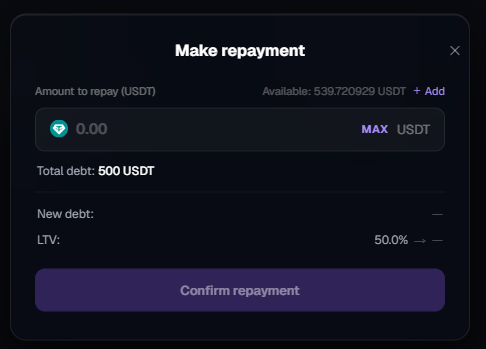
- Partial repayment: reduces total debt and LTV. Collateral stays locked. Payments are applied to accrued interest first, then principal.
- Full repayment: closes the credit line. Collateral is unlocked and returned to your funding account immediately.
How to repay if you do not have USDT/USDC
Each debt is denominated in its own stablecoin (USDT or USDC) and must be repaid in the same stablecoin held in your funding account. A USDT loan cannot be repaid with USDC and vice versa. If you do not have enough of the required stablecoin:- Deposit USDT or USDC into your funding account.
- Sell other assets on Roxom (including, if you choose, BTC you hold outside the collateral) to obtain the stablecoin you need, then repay.
- Move USDT or USDC in from your trading account if you hold it there.
After full repayment
Once a credit line is fully repaid, its row in the Credit Line tab returns to the “open a credit line” view for that stablecoin. You can open a new credit line in that currency whenever you want, with no cooldown. USDT and USDC credit lines are independent, so repaying one has no effect on the other.History Log
The History Log tab (top right of the Loans section) is the full audit trail of your credit line activity. Each row shows:- Date & time of the event.
- Type of event, for example: Interest Accrued, Collateral Liquidated, Liquidation Fee, Loan Liquidated, repayments, top-ups, borrow-more, and opens / closes.
- Amount (in BTC, USDT, or USDC, depending on the event).
- Impact: short description (for example, “Seized for liquidation”, “Liquidation fee”, “Interest accrued”, “Liquidated: collateral fully seized”).
- Loan: the loan ID associated with the event.
- Status: typically Completed.
Where to look in the app
Related reading
BLOC (Bitcoin Line of Credit)
Why the product exists and how the economics work.
Rates and terms
APR, limits, fees, and currency.
LTV, margin calls, and liquidation
Thresholds and what happens if BTC drops.
Repayment and interest
How interest accrues and how to repay.