

Where to find Preferences
Click the toggle icon in the top-right of the header, between the Buy / Sell button and the notifications bell, to open the Preferences panel.Your preferences are saved at the account level and sync automatically across web and mobile. You only need to set them once.
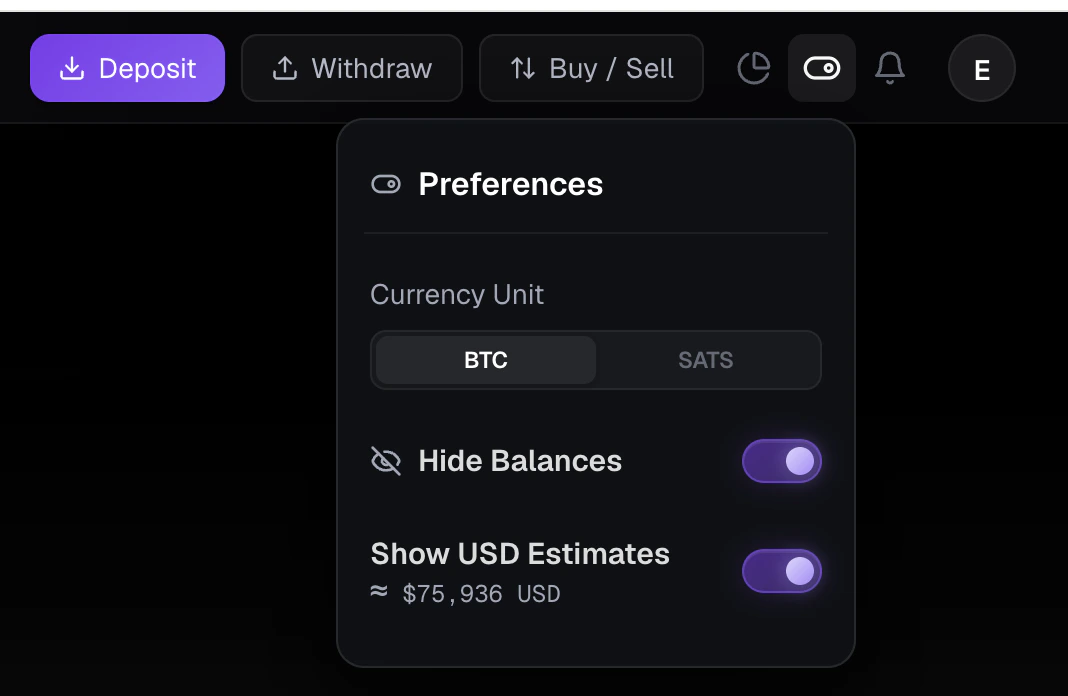
Available preferences
The Preferences panel includes four settings:Language
Choose the language used across the Roxom.com website. English and Español are available. To switch:- Open the Preferences panel from the header.
- Select your language under Language.
The language setting applies to the Roxom.com website. This Help Center is currently available in English only.
Currency Unit: BTC, SATS, or USD
Choose the unit Roxom uses to display amounts everywhere on the platform:- BTC: amounts are shown in whole Bitcoin (e.g.,
0.00075000 BTC). Best for larger holdings and a more traditional view. - SATS: amounts are shown in satoshis, the smallest unit of Bitcoin (e.g.,
75,000 sats). Best for trading, small amounts, and reading prices more easily. - USD: amounts are shown in US dollars (e.g.,
$75,936 USD), converted from BTC at the current market price. Best if you prefer to read balances and prices in fiat terms.
1 BTC = 100,000,000 sats. The BTC ↔ sats conversion is fixed, switching between them only changes how the number is displayed, not its value. USD amounts are converted from BTC at the current market price and will change as the price moves. Learn more in Supported currencies.
Hide Balances
Toggle Hide Balances on to mask all balance and value figures in the interface. Numbers are replaced with dots (e.g.,••••••).
Use this when you want to:
- Screenshot or screen-share without exposing your portfolio
- Use Roxom in public spaces
- Reduce visual distraction while reviewing markets
Hiding balances is a display-only setting. It does not affect trading, deposits, withdrawals, fees, or any automated processes. You can toggle it on or off at any time.
- Account balances in the header and wallet views
- Position sizes and unrealized P&L
- Order amounts in open orders and history
- USD estimates (if enabled)
Show USD Estimates
Toggle Show USD Estimates on to display an approximate USD value next to your BTC amounts (e.g.,≈ $75,936 USD).
Use USD estimates when you want a quick fiat reference for your holdings, but always rely on the BTC value as the source of truth.
For background on why everything on Roxom is BTC-denominated, see Supported currencies.
Frequently asked questions
Do these preferences affect the API or my actual balances?
Do these preferences affect the API or my actual balances?
No. Preferences only change how values are displayed in the Roxom web and mobile apps. API responses, balances, orders, and settlements are unaffected.
Can I change preferences at any time?
Can I change preferences at any time?
Yes. Open the Preferences panel from the header and toggle any setting on or off whenever you want. Changes apply immediately.
Will my preferences sync between web and mobile?
Will my preferences sync between web and mobile?
Yes. Preferences are saved to your account, so they apply automatically on any device where you log in.
Does switching between BTC, SATS, or USD affect fees or P&L calculations?
Does switching between BTC, SATS, or USD affect fees or P&L calculations?
No. The unit is purely a display choice. Fees, margin, and P&L are calculated the same way regardless of which unit you have selected.
Need help?
Still have questions? You can speak to Roxy, our AI support assistant, available 24/7 in the chat bubble at the bottom right of your screen. You can also contact our support team directly at help@roxom.com.Related articles
Supported currencies
Open article
Understanding your Roxom accounts
Open article