

Security
GF: Graph Fundamentals
Chart company fundamentals over time and compare them across companies, with FRED and shipping data too.
Graph Fundamentals charts any fundamental metric (revenue, margins, EPS, cash flow, multiples) over time, and lets you compare several companies on one chart. You can also add macro series (FRED, rates, shipping traffic) to the same chart.
GF follows its link group.
Aliases: GRAPH, FUNDG
How to use GF
| You type | Result |
|---|---|
NVDA GF ENTER | Charts Nvidia’s fundamentals. |
FRED:DCOILWTICO ENTER | Typing a macro series and pressing ENTER charts it in GF. |
Controls
- Quarterly / Annual / Daily frequency and a range from 1Y to Max.
- Overlay or Split panes, ±σ bands and =100 to rebase every series.
- + Add series adds a metric, another company or a macro series. The SERIES sidebar lets you hide (◉), move to the left axis (L), invert (−1), rename (✎) or remove (✕) each one.
- ◆ Export saves a CSV (Pro).
Templates and saved charts
The window menu has ready-made templates (for example Hormuz / Oil / Fed, Red Sea shipping, AI capacity squeeze and Revenue + net margin), Save chart… and Copy share link.
Window menu
Open ▾ in the title bar (or right-click the window) for GF’s options:
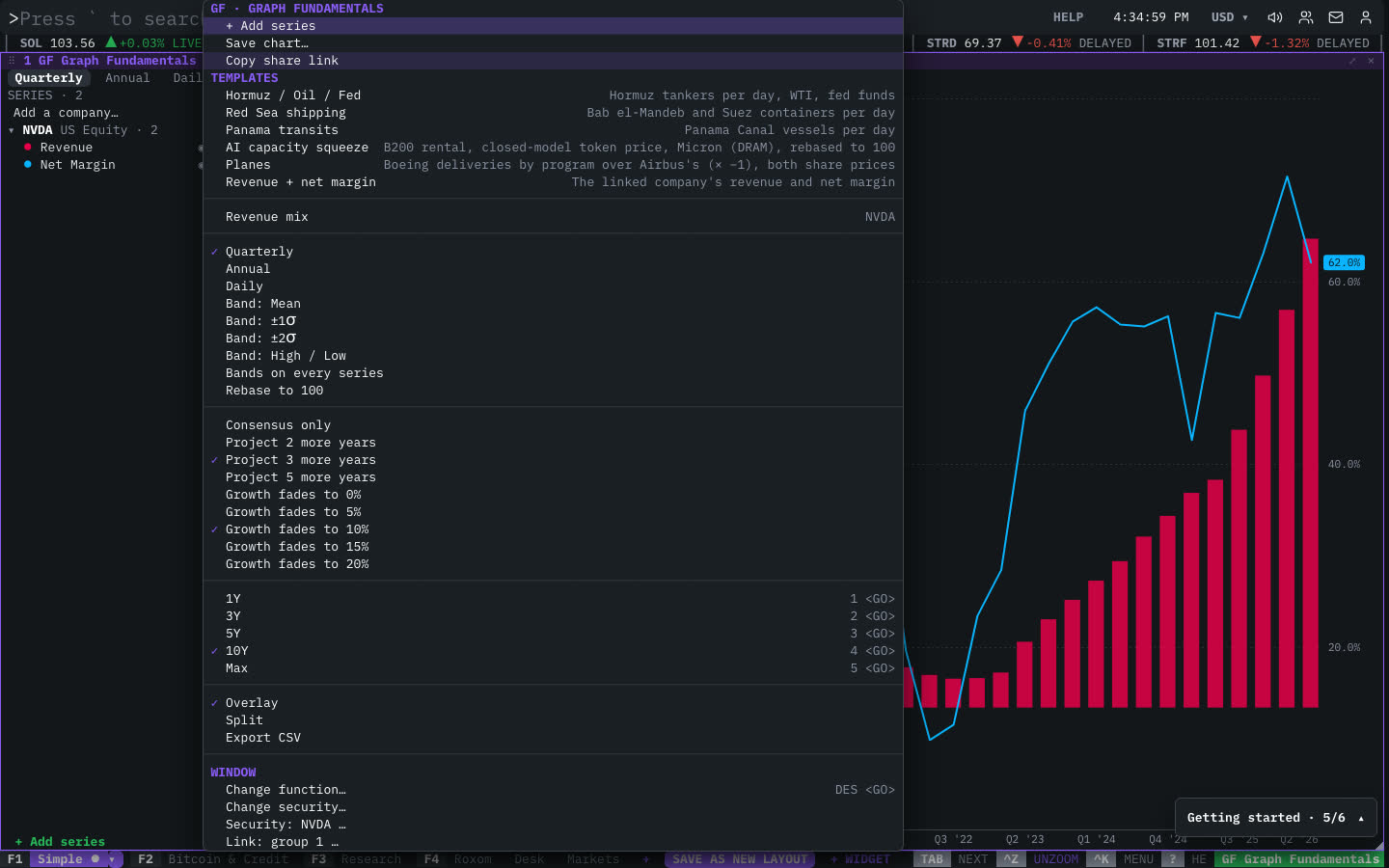
| Menu item | Shortcut |
|---|---|
| + Add series | |
| Save chart… | |
| Copy share link | |
| Templates | |
| Hormuz / Oil / Fed | Hormuz tankers per day, WTI, fed funds |
| Red Sea shipping | Bab el-Mandeb and Suez containers per day |
| Panama transits | Panama Canal vessels per day |
| AI capacity squeeze | B200 rental, closed-model token price, Micron (DRAM), rebased to 100 |
| Planes | Boeing deliveries by program over Airbus's (× −1), both share prices |
| Revenue + net margin | The linked company's revenue and net margin |
| Revenue mix | NVDA |
| Quarterly | |
| Annual | |
| Daily | |
| Band: Mean | |
| Band: ±1σ | |
| Band: ±2σ | |
| Band: High / Low | |
| Bands on every series | |
| Rebase to 100 | |
| Consensus only | |
| Project 2 more years | |
| Project 3 more years | |
| Project 5 more years | |
| Growth fades to 0% | |
| Growth fades to 5% | |
| Growth fades to 10% | |
| Growth fades to 15% | |
| Growth fades to 20% | |
| 1Y | 1 <GO> |
| 3Y | 2 <GO> |
| 5Y | 3 <GO> |
| 10Y | 4 <GO> |
| Max | 5 <GO> |
| Overlay | |
| Split | |
| Export CSV |
The menu also has the standard window actions: change function, change security, link, open a copy, zoom and close.
Plan limits
| Guest | Free | Pro | |
|---|---|---|---|
| CSV export | — | — | ✓ |
| Comparing three or more companies | — | — | ✓ |
| Every metric over the full history | — | ✓ | ✓ |
See Plans and access.
Related functions
FAQ
What does GF do?
Chart company fundamentals over time and compare across companies.
How do I open GF?
Type GF on the command line and press ENTER. To open it in a new window, type +GF or press ⇧ENTER. Add a ticker first to load a specific security, for example NVDA GF.
Last modified on