

Tools
How to set price alerts in Roxom Pro
Create price and indicator alarms with ALRT and get notified in the terminal, by browser notification, email, Telegram, Discord or webhook.
Alarms (ALRT) watch prices and indicators for you. They are checked on Roxom’s servers, so they fire even when Roxom Pro is closed.
Create an alarm in one line
Type ALRT, the ticker, an operator and a price, and an optional label:
| You type | Fires when |
|---|---|
ALRT BTC-USD > 90000 | Bitcoin is at or above 90,000. |
ALRT MSTR < 140 | MSTR is at or below 140. |
ALRT BTC-USD x> 100000 ath | Bitcoin crosses up through 100,000. The alarm is labelled “ath”. |
ALRT MSTR x< 140 support | MSTR crosses down through 140. |
You can also right-click any ticker and choose Set a price alarm…
Build an alarm with conditions
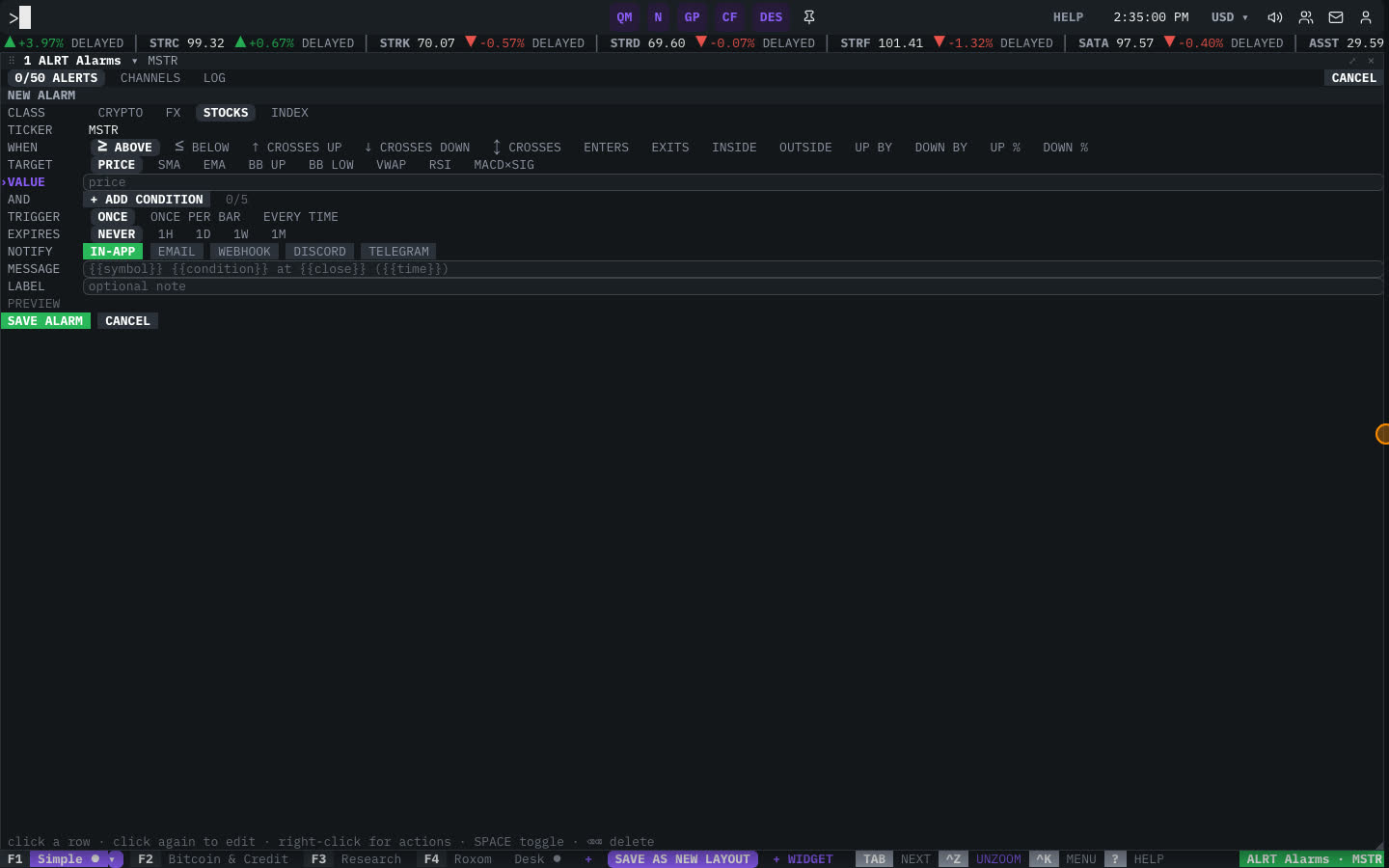
Type ALRT and a ticker (for example ALRT MSTR), or select New alarm… in the ALRT window menu, to open the form:
- Pick the security
CLASS and TICKER: the asset class and the ticker to watch.
- Set the condition
WHEN and TARGET. When can be ≥ ABOVE, ≤ BELOW, ↑ CROSSES UP, ↓ CROSSES DOWN or ↕ CROSSES; for a price level also ENTERS, EXITS, INSIDE and OUTSIDE a range, or moves UP BY / DOWN BY an amount or UP % / DOWN %. Target can be the PRICE or an indicator: SMA, EMA, BB UP, BB LOW, VWAP, RSI or MACD×SIG. Enter the VALUE (and HIGH for a range), the LENGTH of the indicator and the BAR size (1m to 1D).
- Add more conditions (optional)
Use AND to add up to 5 conditions. All of them must be true for the alarm to fire.
- Choose how often it fires
TRIGGER: ONCE, ONCE PER BAR or EVERY TIME. EXPIRES: never, or after 1 hour, 1 day, 1 week or 1 month.
- Choose how to be notified
NOTIFY: every alarm shows a toast and plays a sound in the terminal. Add EMAIL, WEBHOOK, DISCORD or TELEGRAM, and write an optional MESSAGE and LABEL. Then save.
Notification channels
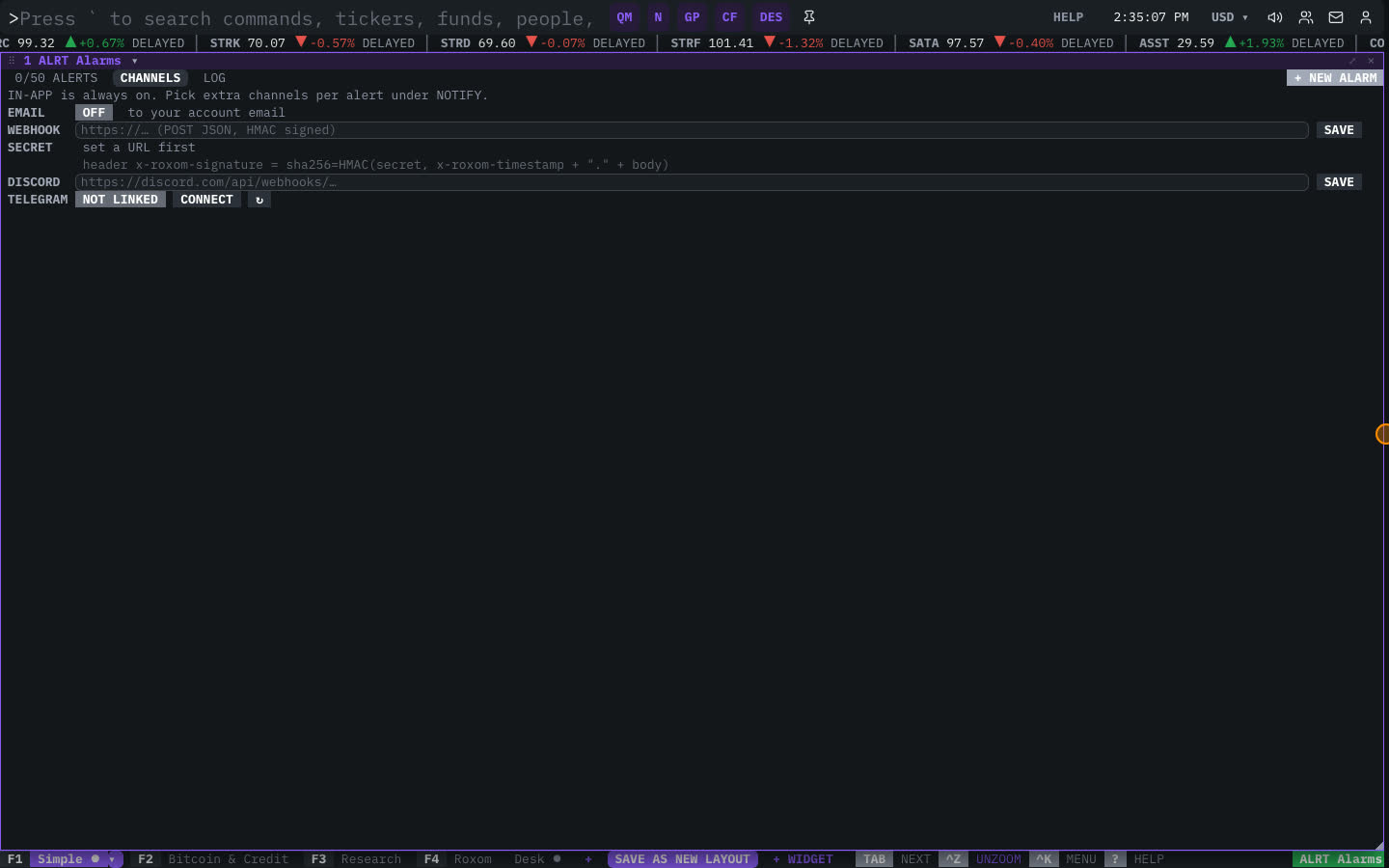
Open the CHANNELS tab in the ALRT window to set up where alarms are sent:
- Email: turn it on to receive alarms at your account email.
- Webhook: paste an HTTPS URL. Roxom sends a signed JSON
POST. Use REVEAL to see the signing secret and ROTATE to replace it. - Discord: paste a Discord webhook URL.
- Telegram: select CONNECT to open Telegram with a one-time link, then confirm in Telegram.
- Browser notifications: select Allow desktop notifications in the window menu so alarms appear even when the tab is in the background.
Manage your alarms
The ALRT window has three tabs: your ALERTS (with how many you have used), CHANNELS and the LOG of alarms that fired.
On an alarm row:
| Action | Shortcut |
|---|---|
| Turn on / off | SPACE |
| Re-arm a triggered alarm | ENTER |
| Edit threshold, label, repeat… | ENTER |
| Delete | ⌫ ⌫ |
Related articles
Last modified on