

Markets
QM: Quote Monitor
Live quotes for your watchlists, with bid/ask, volume and a sparkline per ticker.
The Quote Monitor is your watchlist. It shows live (or delayed) quotes for every ticker in a list, and picking a row loads that ticker into every linked window: chart, profile, news and trade ticket.
Aliases: MON, QMON, W, WL, WATCH, WATCHLIST
How to use QM
| You type | Result |
|---|---|
QM ENTER | Opens your watchlists. |
QM ADD NVDA ENTER | Adds NVDA to the current list. |
QM NEW ENTER | Creates a new list (monitor). |
1 ENTER | Switches to list 1 (2, 3… for the others). |
Watch: Building and using watchlists in the Quote Monitor
Columns
Each row shows SEC (ticker), NAME, LAST with a LIVE/DELAYED tag, NET and %CHG change, BID and ASK, VOL and a SPARK intraday line. Prices flash when they tick. Select Sort by in the window menu to order the list by any column.
Lists (monitors)
You can keep several lists, for example Core, Credit and Miners. Switch with the list name at the top left or the window menu, create one with + NEW or QM NEW, and rename or delete it from the window menu. Signed in, your lists sync to your Roxom account.
Add and remove tickers
- Select + Add ticker… or type
QM ADDand a ticker. - Right-click any ticker anywhere and choose Add to Quote Monitor.
- To remove one, select the row and choose ✕ REMOVE, press ⌫ twice, or use the row’s menu.
Load a ticker everywhere
Click a row twice, or select it and press ENTER. Every window on the same link group switches to it. LOAD at the bottom does the same for the selected row.
Window menu
Open ▾ in the title bar (or right-click the window) for QM’s options:
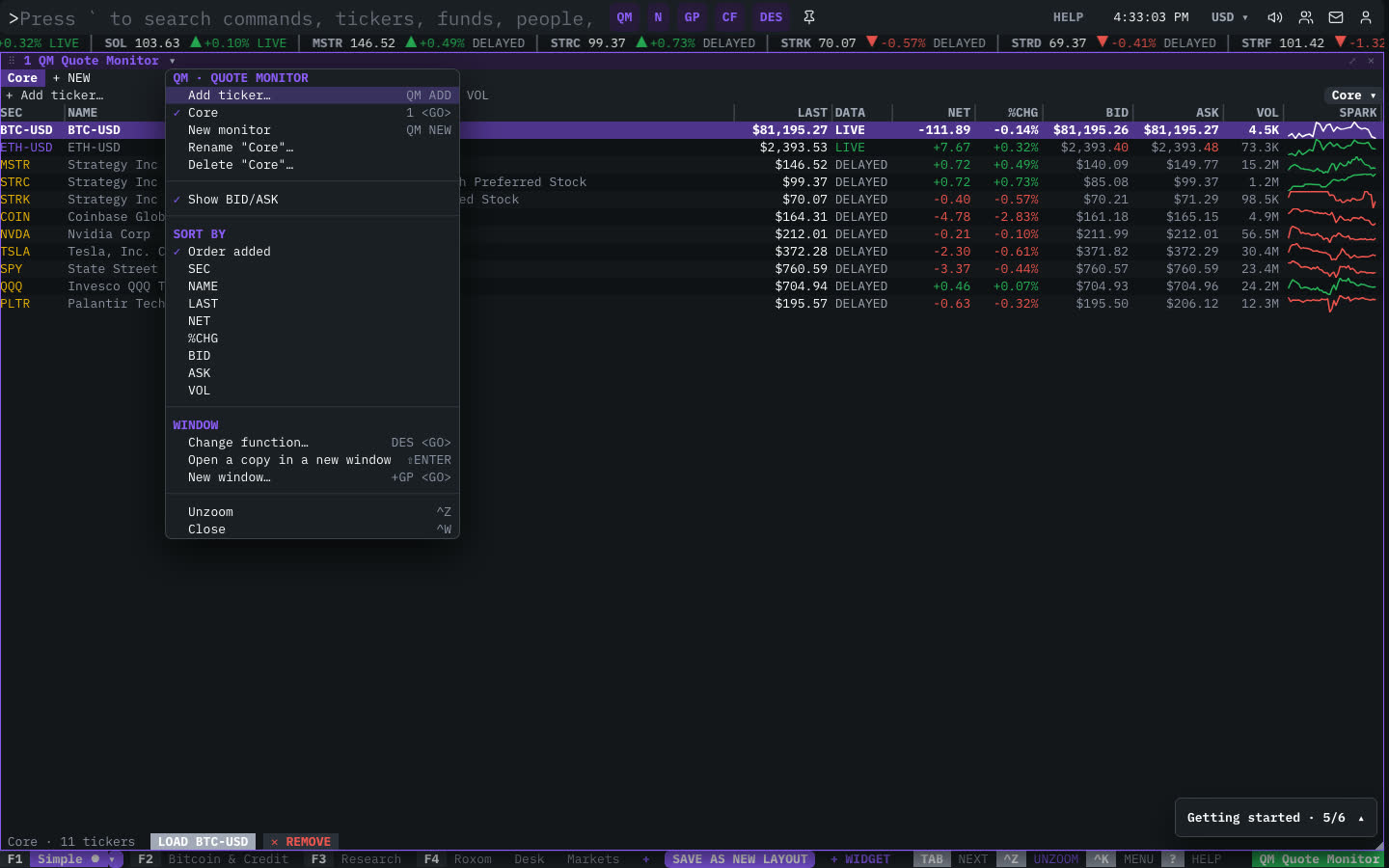
| Menu item | Shortcut |
|---|---|
| Add ticker… | QM ADD |
| Core | 1 <GO> |
| New monitor | QM NEW |
| Rename “Core”… | |
| Delete “Core”… | |
| Show BID/ASK | |
| Sort By | |
| Order added | |
| SEC | |
| NAME | |
| LAST | |
| NET | |
| %CHG | |
| BID | |
| ASK | |
| VOL |
The menu also has the standard window actions: change function, change security, link, open a copy, zoom and close.
Plan limits
| Guest | Free | Pro | |
|---|---|---|---|
| Lists shown | 1 | 5 | All |
| Live bid and ask | — | — | ✓ |
See Plans and access.
Related functions
FAQ
What does QM do?
Live quotes, watchlists.
How do I open QM?
Type QM on the command line and press ENTER. To open it in a new window, type +QM or press ⇧ENTER.
How many lists can I have?
Guests get 1 list, free accounts 5 and Pro unlimited.
Why are BID/ASK hidden?
Live bid and ask are a Pro feature. You can also hide the columns with Show BID/ASK in the window menu.
Last modified on