

Trading & account
How to check your portfolio in Roxom Pro
See everything you own on Roxom, with live P&L, in the PORT window.
The PORT (Holdings) window shows everything you own on your Roxom account in one table: cash, one-click positions, bitcoin in Earn and bitcoin posted as BLOC collateral. It is the Pro version of the Portfolio page.
How to open it
Type PORT and press ENTER, or press F4 for the Roxom layout, which includes it.
Columns
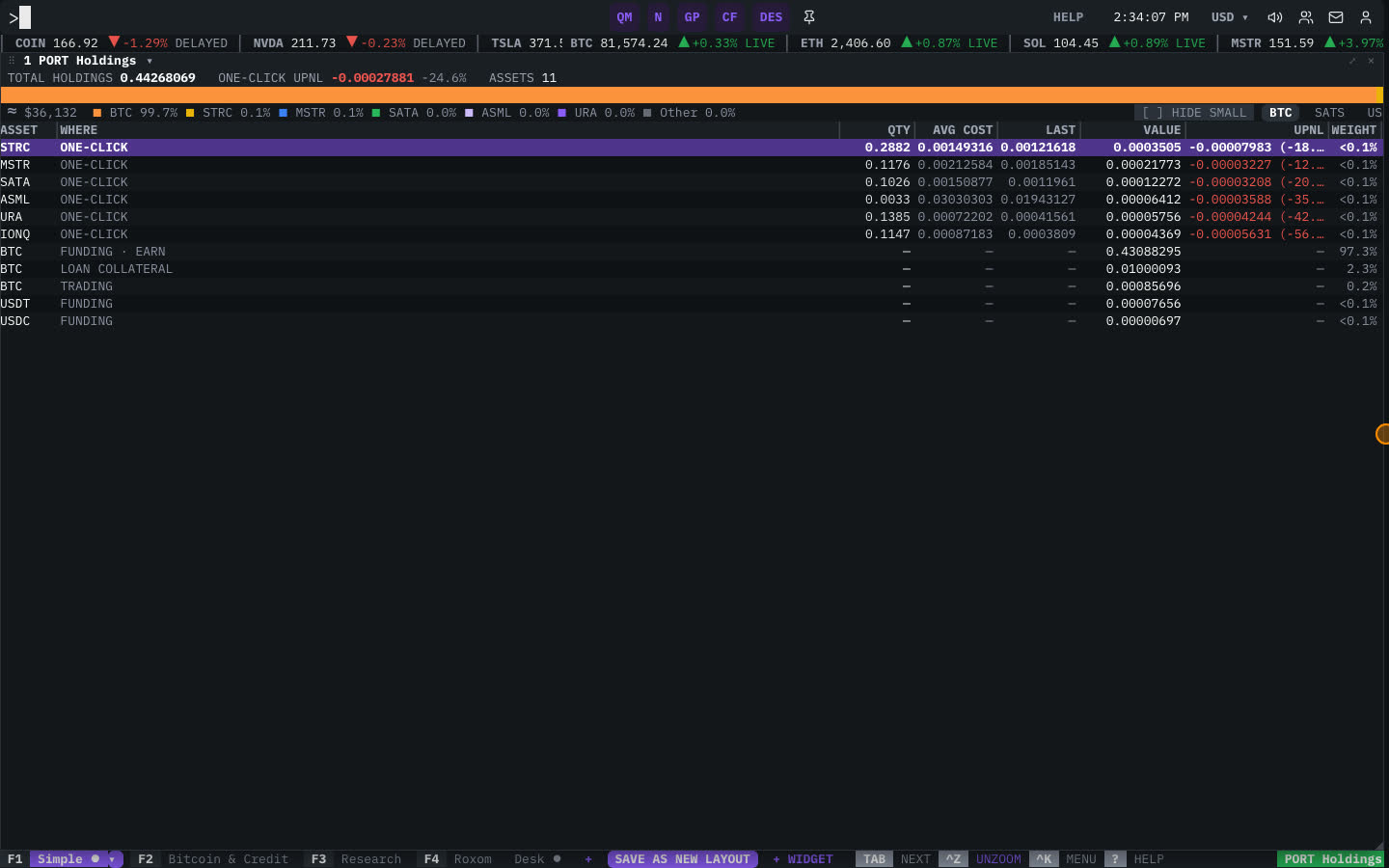
| Column | What it shows |
|---|---|
| ASSET | The asset or position. |
| WHERE | Where it is held: Trading, Funding, Earn or loan collateral. |
| VALUE | Current value in your display currency. |
| WEIGHT | Share of your total. |
| AVG COST | Your average purchase price (positions). |
| LAST | The latest price. |
| UPNL | Unrealized profit and loss, updated live. |
Click a position twice to load it in linked windows (chart, profile, news), or right-click it and choose Trade… to open the ticket.
Related articles
Last modified on