

Tools
How to write scripts in Roxom Pro
Write your own indicators and strategies in the EDIT script editor, run them on the chart, backtest them and share them.
The Script Editor (EDIT) lets you write your own indicators and strategies in TypeScript or Pine Script. Scripts run in your browser on the linked security’s daily bars. You can plot them on the chart, backtest strategies, keep versions, and publish them to the Roxom script store.
The editor
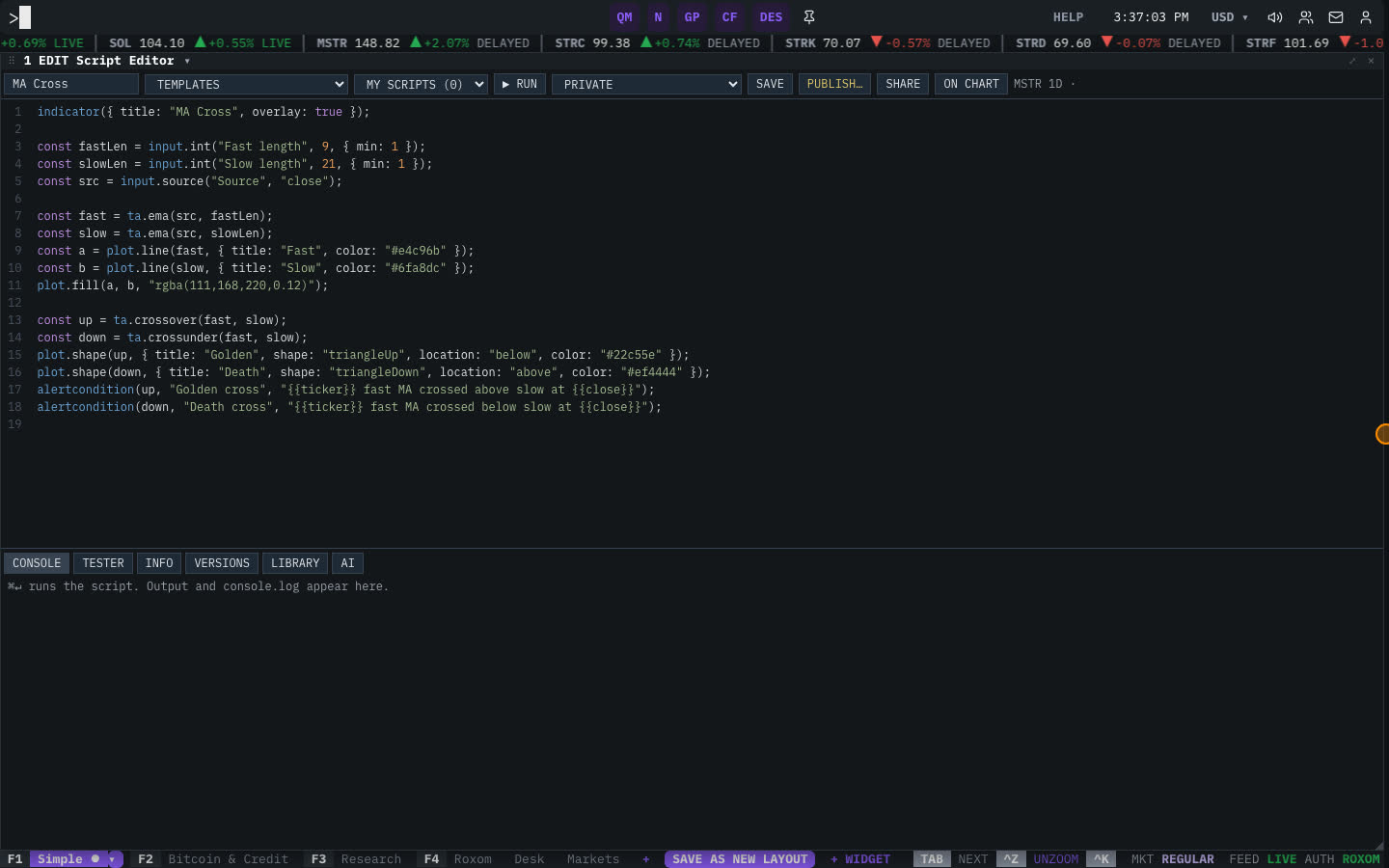
Type EDIT and press ENTER. The window has three parts:
- Left sidebar: TEMPLATES to start from (for example MA Cross, RSI, EMA Ribbon and RSI Reversion (strategy)) and MY SCRIPTS, your saved scripts.
- Toolbar: ▶ RUN, the visibility (PRIVATE, PUBLIC · HIDDEN SOURCE or PUBLIC · OPEN SOURCE), SAVE, PUBLISH…, SHARE and ON CHART. It also shows the security and timeframe the script runs on (for example
STRC 1D). - Code in the middle, and a bottom panel with tabs: CONSOLE, TESTER, INFO, VERSIONS, LIBRARY and AI.
How to write and run an indicator
- Start from a template
Select a template under TEMPLATES, for example MA Cross. Its code opens in the editor.
- Edit the code
Inputs are declared with
input.*(for exampleinput.int("Fast length", 9)), calculations useta.*(for exampleta.ema,ta.crossover), and output usesplot.*. Usealertcondition(...)to define conditions you can alert on. - Run it
Select ▶ RUN or press ⌘/Ctrl + ENTER. Output and any
console.logappear in CONSOLE. - Show it on the chart
Select ON CHART to draw the script on the linked chart (
GP). - Save it
Select SAVE. The script appears under MY SCRIPTS, and each save is kept in VERSIONS, so you can roll back.
Backtest a strategy
Strategies (scripts that place simulated entries and exits, like the RSI Reversion (strategy) template) can be backtested. Run the script and open the TESTER tab to see the trades with their side, entry and exit, the equity curve against buy and hold, and summary statistics. Select EXPORT CSV to download the trades.
Write a script with AI
Open the AI tab, describe the indicator or strategy you want, and select WRITE IT. The generated code opens in the editor for you to review and run.
Library and sharing
- LIBRARY lists public scripts by other users, sorted by MOST USED or NEWEST, with Categories and Search scripts. OPEN a script to read it, INSTALL it to use it, FORK an open-source script to make your own copy, or RATE and REPORT it.
- PUBLISH… shares your script in the store. Choose PUBLIC · OPEN SOURCE to show your code, or PUBLIC · HIDDEN SOURCE to let people use it without seeing the code.
- SHARE copies a link to the script’s public page.
Related articles
Last modified on